What to Do With a Swollen Battery (And How to Dispose of It Safely)
Discovering that your phone or laptop battery has expanded into a puffy "spicy pillow" is terrifying, but panic will only make the danger worse. Trying to push the casing back down or plugging the device into a charger can spark a violent chemical fire within seconds. In this emergency guide, I will show you how to safely cut the power, isolate the device using basic household items, and dispose of it at a certified facility without putting your home or hands at risk.
⚡ Immediate Safety Rules for a Swollen Battery:
- Unplug the power cord immediately: Never push electric current into an expanded cell; shut the device down completely.
- Never squeeze the device: Pressing down on a bowed screen or warped laptop trackpad can puncture the internal pouch and trigger a chemical flare.
- Isolate in a fire-safe spot: Place the device gently into a metal container with sand or on a bare tile floor away from carpets and wood.
- Keep out of regular trash: Swollen batteries catch fire inside sanitation trucks; take them to a dedicated county hazardous waste drop-off.
Decoding the Chemistry of a Swollen Battery
Before you attempt to touch or move the device, you need to understand exactly what is happening inside that bloated plastic wrapper. A lithium-ion battery is a tiny chemical power plant. It relies on a highly controlled physical reaction between different layers of metallic materials and a liquid chemical called an electrolyte.
Under normal, healthy conditions, this chemical reaction flows smoothly back and forth as you charge and discharge your phone.
However, when things go wrong, that perfect chemical balance breaks down completely. The problem usually starts with extreme physical heat, a bad internal manufacturing defect, or simply leaving the battery plugged in long after it has reached maximum capacity.
When the electrolyte liquid gets overstressed, it begins to chemically decompose. This decomposition physically turns the liquid into a highly toxic, extremely flammable gas.
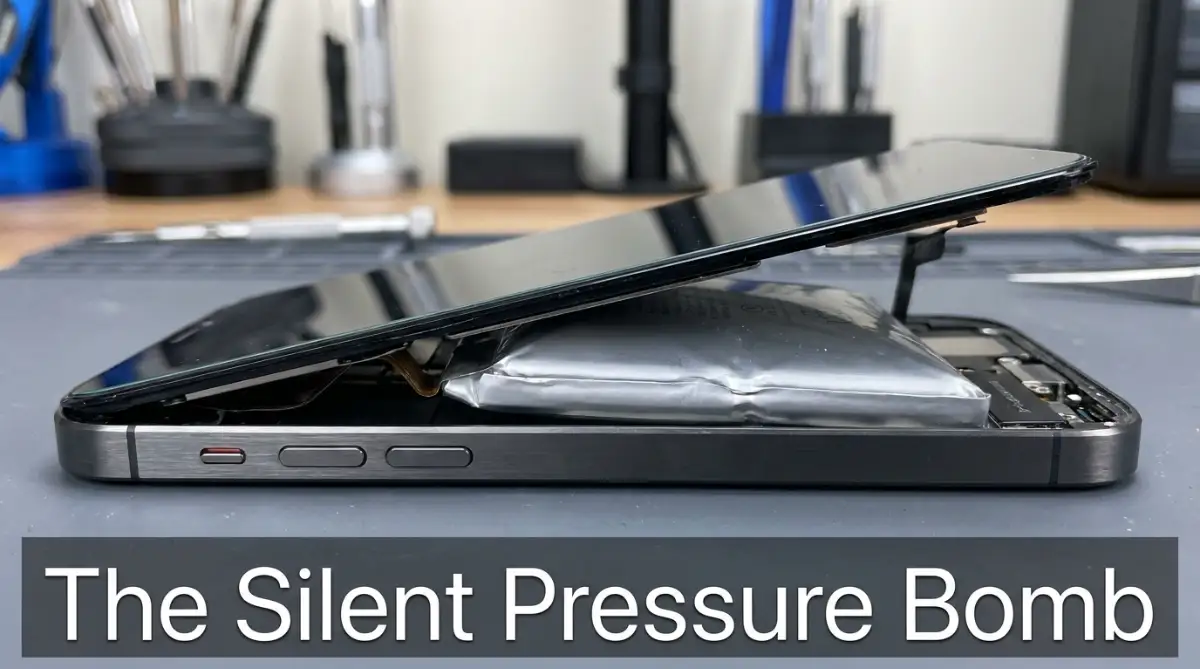
Because modern batteries are sealed inside airtight pouches, this toxic gas has absolutely nowhere to escape. The gas builds up incredible pressure, forcing the silver pouch to stretch and expand like a small balloon.
The internet community often jokingly calls these swollen batteries "spicy pillows." But there is absolutely nothing funny about the massive amount of stored energy waiting to burst out of that tight plastic skin.
Recognizing the Immediate Warning Signs
You rarely catch a battery on the exact day it starts to swell. The chemical buildup is a slow, silent process that happens hidden deep inside the aluminum casing of your device.
You must train yourself to notice the subtle physical clues before the pressure becomes critical. The very first sign is usually a weird screen issue.
If your smartphone screen starts displaying strange pressure marks, or if the glass suddenly lifts slightly away from the metal frame, you have a problem. Do not assume the glue is just getting old.
For laptops, pay close attention to the trackpad. The battery is almost always positioned directly underneath the palm rest. If your mouse trackpad suddenly stops clicking properly, or feels stiff and pushed upward, a swelling battery is physically blocking the mechanical clicker.
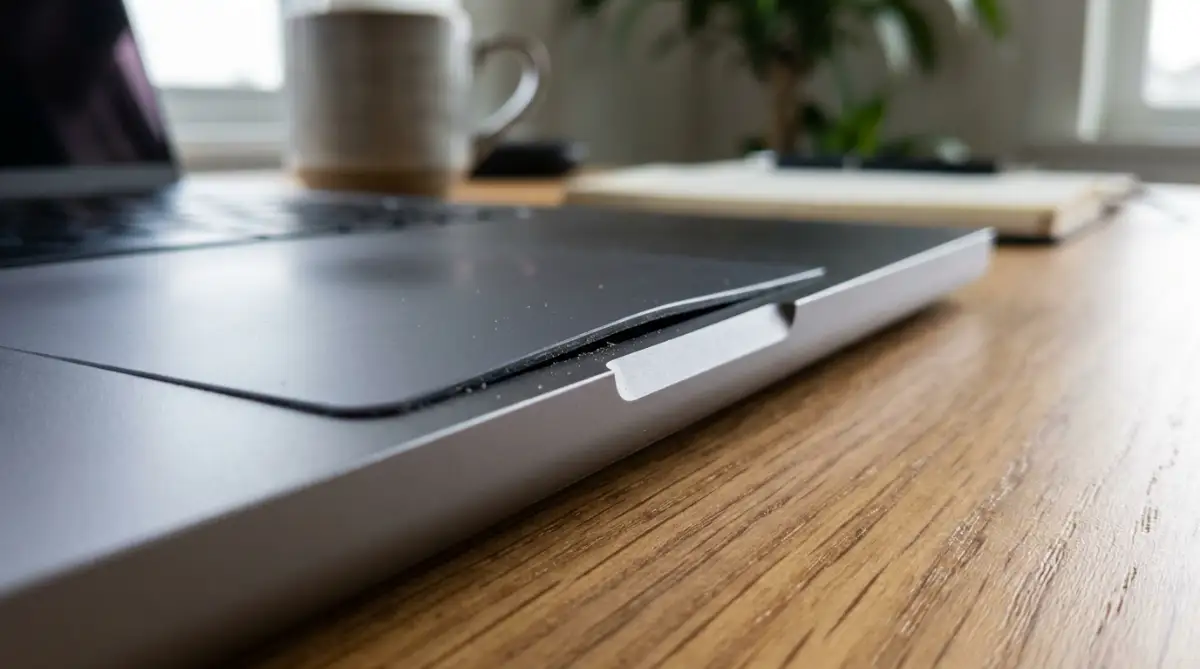
The moment you notice these physical changes, your relationship with that device must change instantly.
🔬 Science Spotlight: Why Swollen Batteries Turn Volatile
If you want to see what is physically happening inside that bloated battery pouch, watch this incredible experiment by Derek Muller on Veritasium. He breaks down the raw chemistry behind lithium-ion cells, showing why they expand under stress and why poking or squeezing one can trigger an instant chemical flare:
Step 1: Kill the Power Source Immediately
The absolute worst thing you can do when you discover a swollen device is to plug it into the wall. You might think the device just needs a little bit of juice to backup your files, but you are literally pouring gasoline onto an active fire hazard.
Pushing fresh electrical current into an already expanding, chemically degraded cell accelerates the creation of toxic gas.
If the device is currently plugged into a wall charger, do not touch the device itself. Follow the cord back to the wall socket and unplug it from the power source first.
Once the device is disconnected from the wall, try to power it down using the normal software shutdown menu. If the screen is broken or the mouse will not click because of the swelling, hold down the physical power button until the screen goes completely black.
Your goal is to completely stop all electrical activity inside the motherboard. The battery is already angry; you do not want the processor demanding power from it and causing further internal heat.
I once made the terrible mistake of trying to squeeze a swollen phone screen back into its frame while it was still turned on. The glass cracked right in my hands, and the phone got incredibly hot. I realized how close I came to puncturing the battery pouch directly. Always power down completely before you play tech doctor.
Step 2: Establish a Safe Isolation Zone
Now that the device is turned off, you are dealing with a sleeping giant. You need to physically move it to a safe location away from anything that can easily burn.
Do not put the device in your car, do not toss it in your backpack, and do not bury it in a drawer full of old papers.
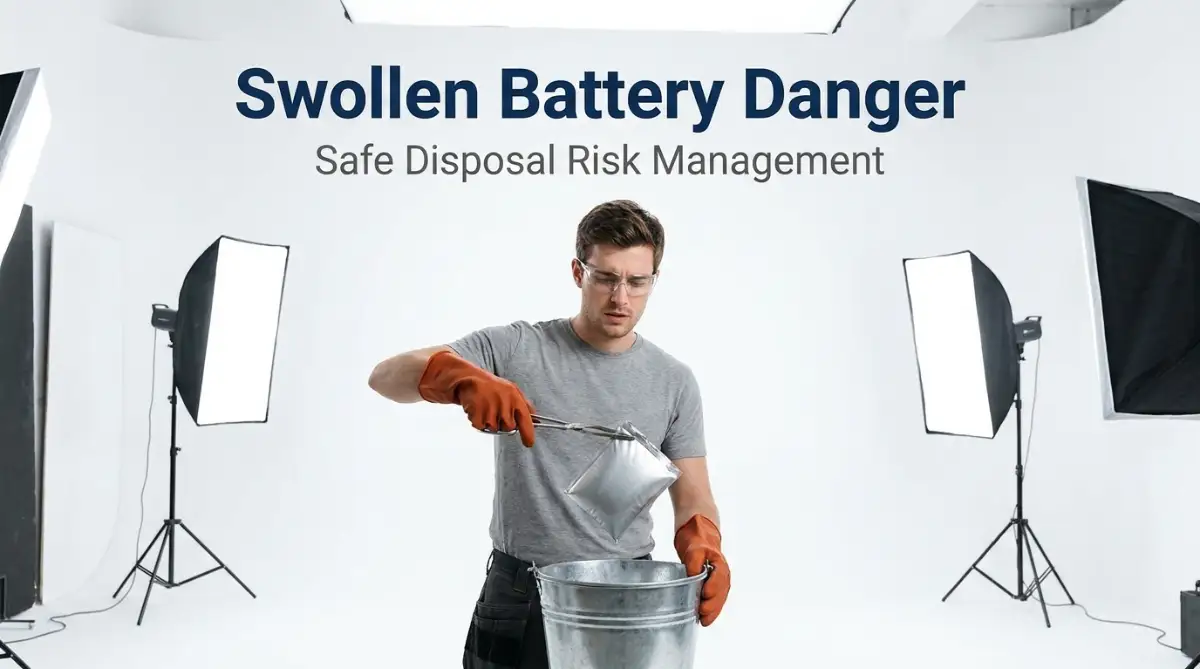
You need to establish a fire-safe isolation zone. The absolute best container for a swollen battery is a heavy metal bucket filled with a few inches of dry sand. The metal will contain any sudden flames, and the sand provides an excellent thermal barrier.
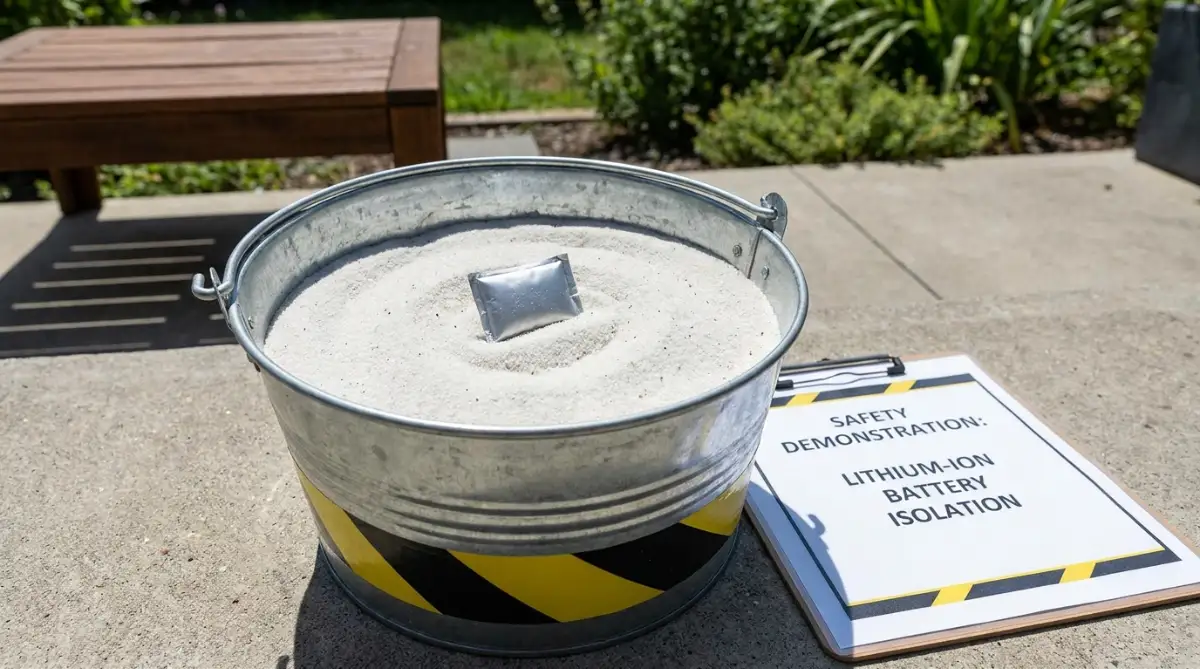
If you do not have a bucket of sand sitting around, a heavy ceramic pot or a deep glass baking dish is an acceptable temporary solution.
Carefully pick the device up like it is a fragile glass ornament. Do not squeeze the chassis. Place it gently inside the metal or ceramic container.
Move the container to an area with excellent ventilation, preferably outside on a concrete patio or a driveway. If you live in an apartment without a balcony, place the container on the tile floor of your bathroom or kitchen, far away from any wooden furniture or curtains.
🧯 Emergency Isolation Matrix: Safe vs. Dangerous Containers
My Safety Rule: Never put a lid on the container. If the battery vents, expanding gas must escape freely into the open air rather than building explosive pressure inside a sealed box.
Step 3: Removing the Battery (If You Can)
This is the step where you must make an honest assessment of your own technical abilities. If your battery is trapped inside a modern, fully glued smartphone or a sealed tablet, you should absolutely not try to pry it open with a kitchen knife.
Prying at a swollen battery with sharp metal tools is a guaranteed way to puncture the thin plastic pouch. If you puncture that pouch, the oxygen in the room will immediately react with the lithium inside, creating a massive, terrifying jet of chemical fire.
If the device is completely sealed, leave it inside the metal bucket and jump directly to Step 4.
However, if you are dealing with an older laptop where the bottom panel easily unscrews, you can carefully remove the battery pack to save the rest of your expensive computer.
Always wear heavy leather work gloves and protective safety glasses when opening a swollen device. Work slowly. Remove the screws and gently lift the battery out using only your fingertips.
Never try to aggressively bend the battery out of a tight slot. If it is stuck, leave it. If you successfully get it out, place the naked battery immediately into your fire-safe bucket.
Step 4: Finding a Hazardous Waste Facility
You have successfully isolated the threat, but you cannot just leave a bucket of sand sitting on your patio forever. A swollen lithium-ion battery is officially classified as hazardous household waste by the government.
You cannot throw it in the regular kitchen trash, and you absolutely cannot toss it into your neighborhood recycling bin.
When regular trash trucks compact their loads, the heavy hydraulic crushers will easily smash a swollen battery. This happens every single day, causing massive, uncontrollable fires inside the back of garbage trucks and at community recycling centers.
You must take the swollen battery to a facility specifically equipped to handle hazardous chemical materials.
Do a quick internet search for "Household Hazardous Waste Drop-off near me" or check your local county government website. Most major cities have a specific day of the week or a dedicated facility where residents can drop off dangerous chemicals for free.
Many major electronics retail stores, like Best Buy, usually accept old electronics for recycling. However, they will often aggressively refuse to accept a battery if it is noticeably swollen due to the massive fire liability it brings to their store. Always call the retailer first and specifically mention that the battery is physically expanded before you drive there.
Safely Transporting the Device in Your Car
When you finally locate a proper hazardous waste facility that will accept your swollen battery, you have to actually drive it there. This is the final, high-stress hurdle.
You do not want a toxic chemical fire starting in your back seat while you are driving down the highway.
Keep the battery inside your heavy metal bucket or ceramic container. Do not seal the container completely airtight with a heavy lid. If the battery does suddenly rupture during the drive, the expanding gases need a way to escape. If you seal the bucket perfectly tight, you are essentially building a small pipe bomb.
Place the bucket securely on the floorboard of your car where it cannot slide around or tip over if you have to brake suddenly.
If possible, keep your car windows slightly rolled down during the trip. If the battery starts to hiss or leak toxic fumes, you need fresh air circulating immediately so you do not pass out from chemical exposure. Drive directly to the facility; do not stop to grab lunch or run errands with a chemical hazard sitting on your floor mats.
🚨 Critical Warning: Signs of an Imminent Fire (Evacuate Immediately)
If your swollen device shows any of these three signs, stop handling it, step away at least twenty feet, and call emergency services:
- A Sweet, Fruity Chemical Odor: This is aerosolized battery electrolyte escaping through a microscopic puncture in the seal.
- A Low Hissing or Whistling Noise: Escaping pressurized gas means the battery pouch is actively tearing open.
- Rapid Heat Without Being Plugged In: If the chassis feels burning hot to the touch while powered off, thermal runaway has already begun.
The Misunderstood Dangers of Cheap Replacements
Once you successfully dispose of the terrifying swollen battery, your immediate thought is probably just buying a cheap replacement online to get your laptop working again.
This is where millions of people make a massive, repeated mistake. They jump on a random marketplace website and buy the absolute cheapest unbranded battery they can find.
Those extremely cheap batteries are cheap for a terrifying reason. They are missing the critical internal safety circuits that monitor voltage and regulate thermal heat. They are basically built using the exact same flawed manufacturing processes that caused your original battery to swell in the first place.
By installing a cheap, unverified battery, you are just resetting the countdown timer for another dangerous swelling event.
You must always purchase replacement batteries directly from the original equipment manufacturer (OEM), or from a highly reputable, certified third-party vendor like iFixit.
Spending an extra forty dollars on an officially certified battery provides you with a massive shield of safety. It guarantees that the internal safety chips actually function correctly, giving you long-term peace of mind.
If you are trying to cut corners financially, you should learn how to speed up your phone with simple steps to clear app cache on android instead of risking your physical safety on cheap electrical components.
Why You Need to Change Your Charging Habits
Fixing the hardware is only half the battle. If you want to permanently avoid dealing with swollen batteries in the future, you have to fundamentally change how you interact with your technology every single day.
The most common cause of battery expansion is severe thermal stress. We constantly subject our devices to terrible charging environments without even realizing it.
Do you plug your phone in at night and toss it onto your soft mattress or bury it under your pillow? When the battery charges, it naturally generates a significant amount of heat. If the phone is smothered by heavy blankets, that heat cannot escape into the air.
The device slowly roasts in its own thermal energy, which aggressively breaks down the internal chemistry and leads directly to gas expansion.
You must charge your devices on a cool, hard surface like a wooden nightstand or a stone kitchen counter. Giving the battery physical room to breathe is the easiest way to double its safe lifespan.
If you are interested in protecting all your expensive gadgets, you should definitely learn how to spot and avoid overheating issues on your gaming consoles as well. Proper thermal management applies to every single piece of tech in your house.
Advanced Defense: Protecting Your Digital and Physical Space
Now that we have successfully neutralized the immediate physical threat of a bloated battery, we need to focus heavily on long-term prevention. Surviving a close call with a "spicy pillow" is a huge wake-up call for anyone who owns expensive tech.
You cannot simply buy a replacement battery and go straight back to your old, careless charging habits. The internal chemistry of lithium-ion technology requires active respect and careful environmental management.
Let us dive deep into the advanced habits and pro-level secrets that IT professionals use to guarantee their batteries stay completely flat and incredibly healthy for years.
The 20-80 Charging Philosophy
If you want to absolutely master your battery's lifespan, you have to completely abandon the idea of charging to one hundred percent. Pushing a battery all the way to maximum capacity puts severe voltage tension on the internal chemical cells.
Imagine blowing up a balloon until the rubber is stretched perfectly tight. If you leave it stretched like that for hours, the rubber weakens and eventually pops.
Your battery feels the exact same tension when it sits at one hundred percent. To relieve this tension, you should actively try to keep your phone and laptop charged strictly between twenty and eighty percent.
This middle zone is the "happy zone" for lithium-ion chemistry. The cells are relaxed, there is almost zero internal voltage stress, and the heat generation is incredibly low. By keeping the battery relaxed, you practically eliminate the chance of random chemical decomposition.
Managing Ambient Storage Temperatures
The physical environment where you store your electronics dictates exactly how fast the battery degrades. Extreme heat and extreme cold are absolute poison for lithium-ion power cells.
If you leave your laptop sitting in a hot car during the summer while you run into the grocery store, you are quietly destroying its internal structure. The ambient heat inside a parked car can easily exceed one hundred and thirty degrees Fahrenheit, which is well past the danger zone for battery chemistry.
Always store your extra phones, tablets, and laptops in a cool, dark, and completely dry place inside your climate-controlled house.
According to guidelines published by the U.S. Department of Energy, maintaining a stable room temperature is the single most effective way to prevent thermal runaway and unexpected cell expansion.
Calibrating the Power Controller
Your device has a tiny, smart computer chip built specifically to talk to the battery. This chip calculates the remaining percentage and displays it on your screen.
However, if you always keep your phone plugged in, or constantly do short, tiny charges throughout the day, this smart chip can actually get confused. It loses track of exactly where "empty" and "full" actually are.
To fix this confusion, you should perform a manual battery calibration about once every three months.
Allow your device to drop completely down to zero percent until it shuts itself off. Then, without turning it on, plug it into the wall and let it charge completely uninterrupted to one hundred percent. This full, deep cycle resets the internal software map, allowing the processor to accurately manage the voltage and prevent accidental overcharging.
Performing regular hardware maintenance like this is incredibly smart, similar to fixing silent freelance profile mistakes by cleaning up old data to ensure everything runs perfectly smoothly in the background.

Fatal Errors That Turn Minor Glitches Into Fire Hazards
Even when people know the absolute basics of handling electronics, panic makes us do incredibly stupid things. When you suddenly discover a bloated, highly dangerous object sitting on your desk, logical thinking often jumps straight out the window.
I have watched so many friends and family members make terrifying, reckless choices simply because they wanted the scary problem to disappear instantly.
Let us walk through the most dangerous, highly destructive mistakes you must avoid at all costs. These are the specific blunders that turn a quiet, swelling battery into a loud, catastrophic house fire.
The Refrigerator Squeeze Myth
This is arguably the most common and terrifyingly dangerous myth circulating on internet forums. Some people actually believe that if a battery starts swelling, putting it inside the refrigerator or freezer will miraculously shrink it back to normal size.
They think the cold air will somehow "cure" the chemical reaction. This is completely, one hundred percent false.
When you place a warm, swelling lithium-ion battery into a cold freezer, physical condensation immediately forms inside the tight plastic pouch. You are literally introducing liquid water into a highly volatile chemical mix.
Worse yet, the extreme cold makes the plastic pouch incredibly brittle. When the expanding toxic gas pushes against this brittle, frozen plastic, it is highly likely to crack and rupture completely.
If that happens, you now have a massive chemical fire inside your kitchen appliance. Never try to freeze or cool down a failing battery artificially. It is a terrible mistake that guarantees destruction, much like making dangerous password management mistakes that permanently compromise your secure data.
Squeezing the Device Back Together
When a laptop trackpad pops up or a phone screen lifts away from the frame, the natural human instinct is to push it back down. You assume a small clip or a tiny screw just came loose.
You place your thumbs firmly on the glass and squeeze hard, trying to click the screen back into place.
If there is a swollen battery underneath that glass, applying heavy downward pressure is the absolute worst thing you can possibly do. You are aggressively compressing a tight balloon full of highly flammable, toxic gas.
By squeezing the device, you force the internal metal components to push directly into the swollen battery pouch. If a tiny piece of metal punctures that pouch while you are squeezing it, the battery will instantly vent a massive jet of fire directly into your bare hands.
If your device suddenly feels warped or pops open, completely step away from it. Do not attempt to force the chassis closed. Treating warped electronics with brute force is a classic rookie mistake, much like trying to force a bad internet connection while struggling with troubleshooting home Wi-Fi dead zones. You have to diagnose the actual root problem first.
Mailing a Swollen Battery
Sometimes people discover a swollen battery and decide they want to invoke their product warranty. They think the smartest move is to pack the bloated device into a cardboard box and ship it back to the manufacturer for a free replacement.
This is incredibly reckless and highly illegal in many countries.
If you put a swollen, volatile battery into a cardboard box and hand it to a postal worker, you are handing them a completely unshielded explosive hazard. Delivery trucks get incredibly hot, and packages are violently thrown around during transit.
The vibration and intense heat inside a shipping truck will almost certainly cause that compromised battery to violently rupture. According to strict guidelines from the Federal Aviation Administration (FAA), shipping damaged or recalled lithium batteries via standard air or ground freight is strictly prohibited due to the extreme fire risk.
If you have a warranty claim, you must physically drive the device to an authorized repair center or follow incredibly specific hazardous shipping protocols provided by the manufacturer. Never toss a spicy pillow into the regular mail system.
Your Action Plan for Total Device Safety
Dealing with a physically expanding battery is incredibly stressful, but you are no longer a confused consumer trapped in a dangerous situation. You now possess the exact, expert-level knowledge required to handle this terrifying chemical hazard safely and confidently.
You understand how important it is to cut the power instantly , isolating the device in a fire-safe bucket, and transporting it directly to a certified hazardous waste facility. You also know that squeezing the screen or relying on internet freezer myths can turn a quiet swelling problem into a massive, life-threatening fire.
Your tech is designed to make your life easier, not burn your house down. By adopting the smart 20-80 charging rule and actively managing your device's heat exposure, you can permanently stop these dangerous chemical reactions before they ever begin.
I used to leave my gaming laptop plugged into the wall twenty-four hours a day, completely ignoring how hot the chassis felt. The day the bottom panel popped open from a swollen battery, my entire perspective shifted. I realized that respecting the powerful chemistry inside my gadgets is the only way to actually protect them. You have the exact same power to manage your tech safely starting right now today!
Common Questions About Swollen Device Batteries
Can a swollen battery fix itself if I leave it unplugged?
No, a swollen battery will never fix itself or shrink back to its original size. The physical expansion is caused by irreversible chemical decomposition and toxic gas buildup. Once the pouch expands, the battery is permanently destroyed and must be safely recycled.
Is it safe to just pop the swollen battery with a needle to let the gas out?
Absolutely not. Puncturing the outer casing of a lithium-ion battery instantly exposes the highly reactive internal lithium to the oxygen and moisture in the air. This chemical reaction will cause an immediate, violent, and uncontrollable fire.
How long does it usually take for a bad battery to catch fire?
It is completely unpredictable. A swollen battery could sit quietly on a desk for several weeks without incident, or it could violently rupture within five minutes of expanding. Because the internal pressure is highly unstable, you must treat the battery as an immediate, active fire hazard.
Do I have to pay to recycle a dangerous lithium battery?
No, in most cases, you do not have to pay. Most county-run household hazardous waste facilities and major electronic retail chains accept dangerous lithium-ion batteries completely free of charge as part of local environmental safety programs.
Will keeping my phone in a thick protective case cause the battery to swell?
Yes, it certainly can. Thick, heavy-duty rubber or leather cases trap the natural heat generated during the charging process. This trapped heat slowly roasts the internal battery cells, drastically increasing the likelihood of chemical breakdown and gas expansion over time.
Can I retrieve the data from my phone if the battery is currently swollen?
If the device still powers on, you can attempt to quickly back up your data to the cloud using a wireless connection. However, you must absolutely not plug the device into a wall charger or a computer via a USB cable, as introducing electrical current to the swollen cell is incredibly dangerous.
Disclaimer: The information provided in this article is for educational, informational, and emergency preparedness purposes only. Handling swollen or damaged lithium-ion batteries carries an extreme risk of chemical fire, toxic gas exposure, and severe physical injury. If you feel unsafe or lack the proper protective equipment to handle a swollen device, evacuate the immediate area and contact your local fire department or hazardous materials team for professional assistance. We are not responsible for any property damage, personal injury, or financial loss resulting from the interpretation or execution of this general safety guide.