I clicked "Empty Trash" on my cloud storage yesterday and immediately felt my stomach sink. I realized my entire folder of tax documents was gone. If you have ever made this terrifying mistake, do not panic just yet. Your files are probably still sitting on the server, and I want to show you exactly how to get them back before they disappear forever.
When you accidentally delete a file, you usually feel a quick moment of stress, followed by relief when you easily pull it out of the digital recycle bin. But when that recycle bin is completely wiped clean, the panic hits you like a physical punch to the chest.
You start calculating the massive amount of hours you will have to spend recreating lost spreadsheets or rewriting long reports. You worry about explaining to your boss or clients that their important data is just gone forever. This constant, heavy anxiety can easily ruin your weekend and completely destroy your peace of mind.
Most people simply accept defeat when they see that empty folder. They assume that once the server says the data is gone, the door is permanently locked.
This assumption is entirely wrong. The internet does not erase things as instantly as these big tech companies want you to believe.

Quick Action Plan: Read This First
- Freeze everything: Stop saving new files, downloading software, or uploading photos immediately to prevent overwriting your deleted data.
- Check local shadow copies: Look into your computer's "Previous Versions" or Time Machine before assuming the cloud server erased it all.
- Contact support within 48 hours: Free cloud accounts often keep a very brief backup window. Send a highly specific recovery request to their support team.
- Ask your IT admin: If you are using a work or school account, your admin has a hidden 25-day backdoor to pull your files back.
Understanding How Cloud Servers Actually Delete Data
To get your documents back, you first need to understand how giant server farms actually process your commands. When you tell a platform to permanently wipe your trash bin, they do not immediately send a digital shredder to destroy your information.
Instead, they simply remove the road map that points to your data. Think of it like a giant public library. If you destroy the index card that tells you where a specific book is located, the book is still sitting on a shelf somewhere in the back room.
The computer just labels that empty shelf space as "available for new books." Until a brand new file is physically written over your old data, your original documents are still floating quietly on the company's hardware.
Because these massive tech companies manage billions of files every single day, it actually takes them a bit of time to fully overwrite your specific digital shelf. This hidden delay creates a secret window of opportunity for you to snatch your work back from the edge of destruction.
The Hidden 25-Day Enterprise Grace Period
If you use a business or school account for your online storage, you have a massive advantage over standard free users. Platforms like Google Workspace and Microsoft 365 have strict administrative safety nets built directly into their foundations.
They know that employees constantly make terrible mistakes. To prevent a single angry worker from deleting an entire company's database, they created a hidden recovery window that normal users cannot see.
If you permanently empty your trash, a central system administrator can actually reach into the server’s back end and reverse your action. For example, Google Workspace admins have exactly 25 days to restore data after a user permanently wipes it from their personal view.
If you are using a company account right now, stop reading and immediately send an email to your IT department. Tell them exactly which folder was deleted and the exact date it happened. They can use their master control panel to roll your specific account back in time and pull those files from the hidden server archives.
How to Fill Out the Template:
Cloud Provider Recovery Windows
Engaging Direct Support for Consumer Accounts
If you are using a standard, free consumer account, you do not have a dedicated IT department to call. However, you still have options if you act incredibly fast.
Major storage providers sometimes keep emergency backups of their servers for a very short period to protect against system-wide hardware crashes. If you contact their customer support team immediately, a real human engineer might be able to pull your data from these system backups.
Before you contact support, watch this detailed breakdown of how to prepare your recovery request for the highest chance of success:
When you reach out to customer service, you must be extremely polite and highly specific. Do not just send a message saying, "My files are missing, please help." Support agents handle thousands of tickets a day, and vague requests are usually pushed to the bottom of the pile.
You need to tell them the exact name of the missing folder, the specific file types (like PDF or Excel), and the exact time zone when the deletion happened. The more specific details you provide, the easier it is for the engineer to locate your lost data in their massive server logs.
The Myth vs. Reality of Data Erasure
Let us clear up some of the biggest misunderstandings about how digital information disappears. Knowing the truth helps you stay calm and act logically during an emergency.
- Myth: Hitting "Empty Trash" permanently wipes the hard drive instantly.
- Reality: Emptying the trash only removes your personal access link. The actual data remains intact on the server until new data overwrites that exact physical location.
- Myth: Customer support will not help users on free plans.
- Reality: While paying customers get faster responses, many companies will attempt a courtesy restore for free users if the request is made within 24 to 48 hours of the mistake.
- Myth: If the mobile app shows an empty folder, the files are completely gone everywhere.
- Reality: Mobile apps often suffer from syncing delays. The files might still be fully accessible through a web browser on a desktop computer.
Uncovering Local Shadow Copies on Your Computer
Sometimes, the secret to recovering online files has absolutely nothing to do with the internet. If you use a desktop synchronization app that keeps your online files mirrored on your local hard drive, you might have a hidden safety net sitting right on your physical desk.
Operating systems like Windows and macOS are constantly creating quiet, invisible backups of your daily activity. Even if the online server completely deletes your file and pushes that deletion down to your computer, your local hard drive might have already saved a ghost copy.
If you use a Windows machine, you can right-click on the main folder where your missing files used to live. Look for an option called "Restore previous versions." This powerful tool pulls data from hidden system restore points, often bringing back documents that the internet claims are gone forever.
Mac users have an incredibly similar feature called Time Machine. If you have this feature turned on in your system preferences, you can literally enter a visual timeline of your computer's history. You simply scroll back to yesterday's date, find the folder before you made the mistake, and hit the restore button.
I actually learned this the hard way after staying awake until 4 AM trying to email support agents. I completely forgot that my laptop had a local backup running in the background. The moment I checked my local drive history, I found my missing tax folder sitting there perfectly intact. My biggest realization was that I should always check my local machine before panicking about what the cloud server is doing.
Disconnecting from the Network Instantly
When you realize a massive mistake has happened, your very first action should be physical, not digital. If you delete something on your phone and empty the trash, that command takes a few seconds to travel through the internet and tell your laptop to do the same thing.
If you quickly turn off the Wi-Fi on your laptop before it has a chance to connect to the internet, you can physically stop the deletion command from arriving.
Your laptop will still show the old version of your online drive, complete with the files you just deleted from your phone. You can then simply copy those files onto a safe USB drive before you turn the Wi-Fi back on.
This quick physical reaction is like grabbing a letter out of a mailbox right before the mail carrier drives away. It requires fast thinking, but it has saved countless professionals from total data disasters.
Utilizing Hidden File Recovery Software
If the official support team says no, and your local computer backups are completely empty, you have one final, aggressive option. You can use deep-scanning recovery software on your local hard drive.
Remember how we discussed that computers do not instantly destroy data? This rule applies to your personal laptop just as much as it applies to giant server farms.
If you had those online files synced to your computer for even a few days, your local hard drive processed that data. When the online server told your laptop to delete the local copies, your laptop just removed the index cards.
You can download specialized data extraction tools designed to read the raw, magnetic surface of your hard drive. These programs bypass the normal operating system folders and look directly for the hidden ghost footprints of your deleted files.
The Right Way to Run a Deep Scan
If you decide to use extraction software, you must follow one massive rule to avoid ruining your chances. Do not install the recovery software on the exact same hard drive where your missing files used to live.
Downloading and installing a heavy new program writes new data to your computer. If you are unlucky, that new installation might overwrite the exact empty space where your ghost files are hiding.
Always download the extraction tool onto a separate USB flash drive using a completely different computer. Then, plug that flash drive into your affected computer and run the program directly from the USB stick.
This careful method ensures that you are not accidentally destroying the very evidence you are trying to rescue. It is a slow, deeply technical process, but when everything else fails, it is a highly effective way to pull your hard work back from the edge of the digital cliff.
Navigating the Microsoft Second-Stage Recycle Bin
If you happen to use Microsoft's enterprise storage solutions, your safety net is actually double-layered. Many office workers completely panic when they empty their primary recycle bin, not realizing there is a hidden basement underneath it.
Microsoft SharePoint and OneDrive for Business utilize a feature called the Second-Stage Recycle Bin. When you empty your personal trash, the files do not go straight to the shredder. Instead, they drop down into a hidden site-collection bin managed by the network administrator.
These files usually sit quietly in this secondary basement for up to 93 days. You cannot see this basement from your normal daily dashboard. You have to actively ask your IT manager to log into their global admin center and pull the files back upstairs for you.
This feature alone has saved thousands of major corporate presentations and financial spreadsheets. Always remember that enterprise software is designed to expect human error, so never assume your first mistake is permanent.
Setting Up Bulletproof Future Backups
Once you successfully navigate this terrifying experience and get your documents back, you must change how you treat your digital property. Surviving a massive data scare should be a heavy wake-up call to fix your daily habits.
Relying on a single online company to hold the only copy of your life's work is a terrible strategy. Servers can crash, accounts can be randomly suspended by automated bots, and simple human mistakes can wipe out years of progress.
You must build a redundant system where your files exist in three separate places. We call this the 3-2-1 backup strategy, and it is the gold standard for digital protection.
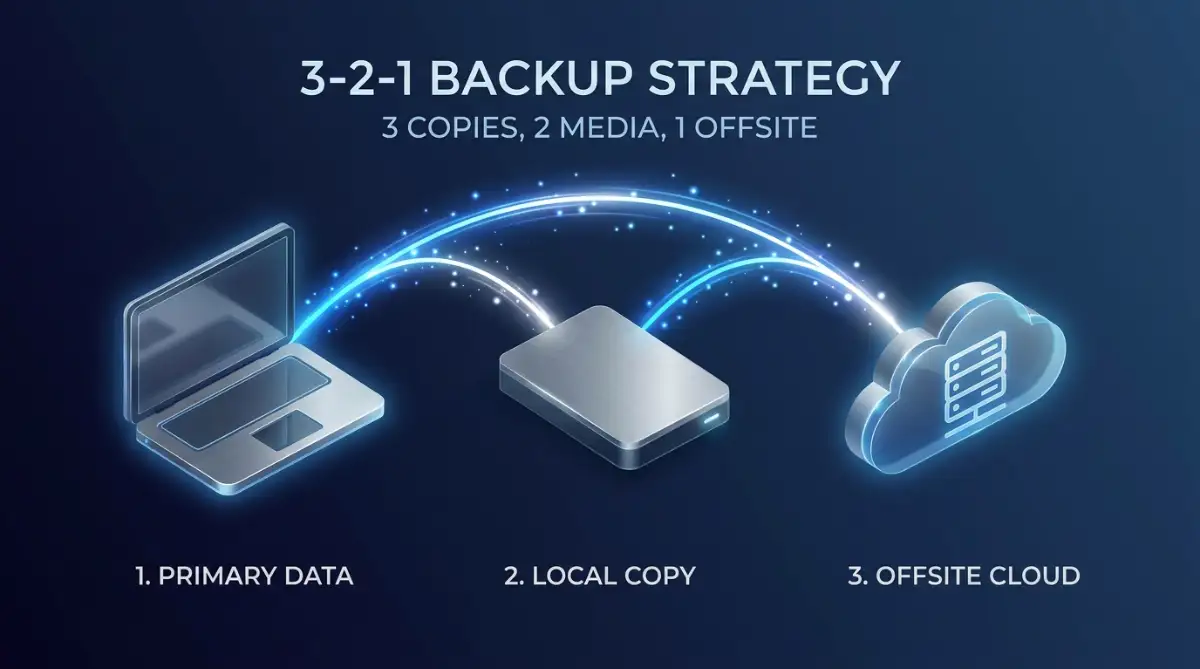
Keep three total copies of your important data. Keep two copies on different local devices, like your main laptop and a physical external hard drive sitting on your desk. Keep the final copy off-site on a secure online server.
Why Physical Drives Still Matter
In a world obsessed with wireless technology, holding a physical piece of metal might feel old-fashioned. But an external hard drive sitting quietly in your drawer cannot be hacked by a remote scammer, and it cannot accidentally sync a deletion command from your smartphone.
Physical drives provide an absolute, permanent snapshot of your work that remains completely frozen in time until you plug it in. Every single Friday afternoon, make it a strict habit to drag your most important folders onto a physical drive.
This simple five-minute routine builds a massive wall of security around your career. If the internet goes down, or if you accidentally click the wrong button and wipe your online trash bin again, you will not feel a single drop of panic.
You will simply open your desk drawer, plug in your drive, and smile, knowing your hard work is perfectly safe and entirely under your own control. Taking full ownership of your data removes the anxiety of modern technology and lets you focus completely on creating your best work.

Mastering Advanced Recovery Tactics
If you have tried the basic steps and your files are still missing, do not panic just yet. The digital world has many hidden layers, and professional data engineers use specific tactics to dig deeper into those layers. We need to look at your problem the same way a detective looks at a cold case.
The absolute best secret in the data recovery industry is understanding how third-party app integrations work. Most people connect their primary online storage account to a dozen other software tools without even thinking about it.
For example, you might have connected your storage drive to a project management tool, an automatic email backup service, or an online PDF editor. When you permanently delete a file from your main storage bin, those connected apps do not always get the memo immediately.
Sometimes, those third-party services create their own independent backup copies of your documents. If you log directly into those connected apps, you might find a perfect, slightly older version of your deleted spreadsheet sitting quietly in their internal history logs. According to data persistence studies by the IEEE Computer Society, decentralized app permissions frequently cause data to remain active on secondary servers long after primary deletion.
Leveraging the Power of Version History
Another incredibly powerful tool that people completely forget about is the "Version History" feature. This feature does not just save the final copy of a document; it actively records every single change you make over time.
If you accidentally overwrote a massive folder of data before deleting it, or if a virus corrupted your files, you can use version history to travel back in time. You can simply right-click the main folder containing the missing items and select the version history option.
From there, you can choose a snapshot of the folder from three days ago. The system will magically restore the entire folder exactly as it looked on that specific day, completely bypassing the empty trash bin problem. This is a massive lifesaver for collaborative projects where multiple people are editing files constantly.
The "Shared Link" Backdoor Strategy
Here is a slightly unconventional trick that works surprisingly well. If you ever shared the deleted file with a coworker or a client using a direct email link, that specific link might still be secretly active.
Sometimes, online platforms cache (temporarily store) highly trafficked shared links on a completely different set of regional servers. This means the file might be deleted from your personal dashboard, but the public viewing link is still alive.
Go back through your sent emails or chat messages and find the original sharing link you sent to your colleague. Click it. If the preview window opens, immediately hit the download button to grab a local copy before the system fully updates and breaks the link permanently. Finding these hidden backdoors requires exactly the same kind of smart detective work as figuring out what to do if your hard drive crashed how to rescue your lost files before it s too late.
Fatal Mistakes That Guarantee Total Data Loss
When you realize a permanent deletion has happened, your brain instantly floods with adrenaline. You want to fix the problem as fast as humanly possible. Unfortunately, rushing through a technical crisis usually leads to permanent, unfixable damage.
I have watched dozens of smart professionals accidentally destroy their only chance of recovery simply because they panicked and clicked the wrong buttons. Let us walk through the most dangerous pitfalls you must absolutely avoid during an active data emergency.
The Overwriting Trap (Creating New Data)
The absolute worst thing you can do when you lose a file is to continue using your computer or your online account normally. As we discussed earlier, deleted files are just hidden ghost data waiting to be overwritten by new information.
If you open Photoshop and start saving massive new image files to your storage drive, you are physically crushing those ghosts. Every new gigabyte of data you upload is hammering nails into the coffin of your lost documents.
The moment you realize a file is missing, you must treat your computer like an active crime scene. Stop downloading new software, stop saving new documents, and immediately close all unnecessary background applications. You need to keep the digital environment completely frozen until you run a proper recovery scan.
Trusting Shady Free Recovery Software
When you search the internet for help, you will immediately see hundreds of bright, flashing ads for "Free 1-Click Data Recovery" software. These programs promise to magically bring back all your files in ten seconds.
Do not click on them. The vast majority of these free, unverified programs are actually highly dangerous malware disguised as helpful tools.
If you install a shady program, it might actively encrypt your entire hard drive, locking you out of all your remaining files until you pay a massive ransom. This is a terrifying situation that is infinitely worse than losing a single folder. You must protect your sensitive data with the same intensity you use to avoid dangerous password management mistakes that leave your digital identity exposed online. Always stick to highly reviewed, premium software tools recommended by professional IT administrators.
Ignoring the 30-Day Hard Deletion Window
Many people mistakenly believe they can deal with a deleted file problem next month when they have more free time. They leave the issue alone, assuming the data will just wait patiently for them to return.
This is a massive, highly destructive misunderstanding of how modern server maintenance works. Giant tech companies perform automated "hard sweeps" on their servers constantly to free up physical space.
According to compliance documentation from the Cloud Security Alliance, most major platforms legally guarantee that permanently deleted user data is physically scrubbed from all backup servers within 30 to 60 days. Once that automated sweep happens, your data is literally turned into scrambled digital dust. You do not have months to act; you usually have less than two weeks before the window closes forever.
Your Bulletproof Strategy for Digital Peace of Mind
Navigating a severe data loss crisis is incredibly stressful, but it does not have to be the end of the world. You now possess the exact same strategic knowledge that professional data recovery specialists use to rescue massive corporate accounts.
By understanding how servers manage ghost data, utilizing hidden version histories, and avoiding the dangerous trap of overwriting, you give yourself the absolute best chance of getting your files back. You are no longer crossing your fingers and hoping a massive tech company takes pity on you.
Instead, you are confidently commanding your own digital environment. This simple shift in your technical approach removes the fear of working online and gives you incredible power over your own productivity.
The "Never Again" Action Plan
You cannot control when a server glitches or when you make a clumsy mistake with your mouse. However, you can completely control how prepared you are for the next disaster. Here is exactly what you should do this afternoon to guarantee you never feel that empty-trash-bin panic again:
- Audit Your Connected Apps: Review all third-party software connected to your main storage drive and ensure they are creating independent, weekly backups of your projects.
- Invest in a Physical Drive: Buy a high-quality external hard drive today. Set a strict weekly alarm on your phone to remind you to drag your most important folders onto that physical drive.
- Check Your Local Sync Settings: Ensure your desktop synchronization app is actually keeping a full, offline copy of your files on your computer, rather than just saving "online-only" shortcuts.
Looking back, losing that massive folder of tax documents was honestly the best thing that ever happened to my digital habits. It forced me to stop being lazy and actually build a professional, fail-proof backup system for my entire career. You absolutely have the power to protect your hard work from disappearing into the digital void, so take ten minutes today to set up your external drive and take complete, fearless control of your data starting right now!
Common Questions About Cloud Data Recovery
Can I really get a file back after I click "Empty Trash" online?
Yes, it is often entirely possible. Emptying the trash simply removes your personal access link to the file. The actual digital data usually remains hidden on the company's massive servers until a new piece of data physically overwrites that exact location, which can take several days or even weeks.
Why do business accounts have a better chance of recovering deleted files?
Business and enterprise accounts feature a hidden secondary safety net managed by system administrators. Platforms like Google Workspace allow the main IT admin to reach into the server’s back end and reverse permanent deletions up to 25 days after the user emptied their personal trash bin.
Will standard customer support help me if I have a free storage plan?
While free users do not have a dedicated IT team, contacting official support immediately is still a smart move. Many companies keep short-term emergency server backups and may attempt a courtesy restore if you provide highly specific details (like exact file names and timestamps) within 24 to 48 hours of the deletion.
Is it safe to use free data recovery software I found online?
You must be incredibly careful. Many heavily advertised "free 1-click recovery" tools are actually dangerous malware designed to lock your hard drive and steal your personal information. Always rely on premium, highly reviewed extraction software recommended by verified IT professionals.
What is the biggest mistake people make when trying to recover a lost file?
The absolute biggest mistake is continuing to use the computer or online account normally. Downloading new software or saving new files actively overwrites the hidden "ghost" data of your deleted files, permanently destroying any chance of a successful recovery.
Financial & Legal Disclaimer: The information provided in this article is strictly for educational and general informational purposes only. We do not provide professional IT support, legal advice, or guaranteed data recovery services. The success rate of data recovery varies wildly depending on the specific storage provider, the hardware involved, and the exact time elapsed since deletion. Always consult with a certified data recovery specialist or your company's official IT department before attempting advanced deep-scanning procedures on sensitive commercial equipment.