Have you ever put on a pair of wireless earbuds, watched a character slam a door on screen, and heard the sound arrive a full second later? It is completely maddening. We cut the cord to enjoy seamless convenience, only to end up fighting invisible audio lag. But your expensive earbuds are not broken—they are just speaking the wrong digital language. Let me show you how to fix your Bluetooth latency and get your audio and video perfectly synced.
📌 Quick Summary: How to Fix Bluetooth Audio Lag
- Check Your Codecs: Make sure your phone and earbuds are using fast audio languages like AAC or aptX instead of slow SBC.
- Watch Out for Interference: Keep your devices away from heavy Wi-Fi routers and unshielded USB hubs that crowd the 2.4 GHz radio band.
- Beware of Low Battery: When your earbuds or phone drop below 20% battery, they enter power-saving mode, which spikes audio latency.
- Clean the Contacts: Wipe down the metal charging pins regularly to ensure a clean electrical handshake and stable connection.
Decoding the Invisible Language of Wireless Audio
To actually fix the lag, we have to stop treating Bluetooth like magic and start understanding it as a very busy digital delivery service. When you plug old-school wired headphones into a headphone jack, the audio signal travels instantly through the copper wire. It moves at the speed of light.
But with true wireless earbuds, the process is incredibly complicated.
Your smartphone has to take the heavy digital audio file, pack it into a tiny digital box, and shoot it through the air using radio waves. Your earbuds then have to catch that flying box, unpack it, turn it back into a sound wave, and push it into your eardrums.
This packing, flying, and unpacking process takes physical time. In the tech world, this required time is called latency. Every single wireless audio device on the planet has some level of latency built into it.
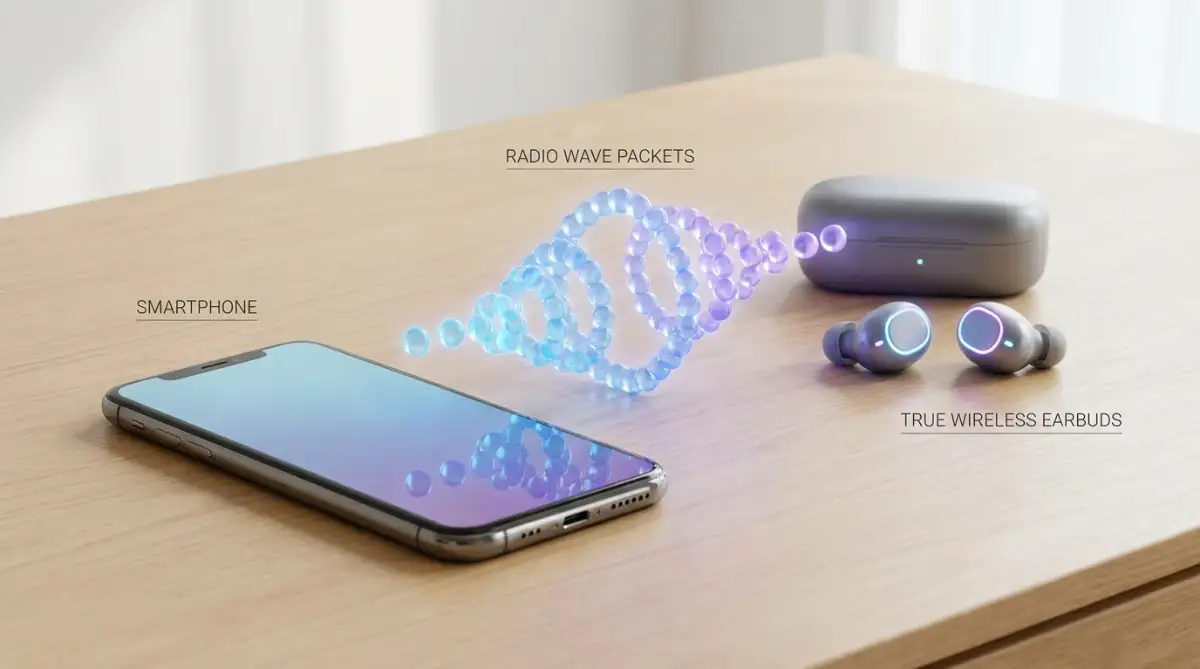
The goal is not to eliminate it completely, because that is physically impossible without a wire. The actual goal is to shrink that delay down so small that your human brain cannot even notice it anymore.
The Secret Translation Delay (Audio Codecs)
The absolute biggest culprit behind massive audio delay is a mismatch in the "codec" your devices are using. A codec is simply the specific software language your phone and your earbuds use to compress and decompress the audio files.
Think of it like two people trying to have a fast conversation. If they both speak perfectly fluent English, the conversation flows instantly. But if one person speaks English and the other only speaks Spanish, they have to use a slow translator in the middle of their conversation.
Most cheap earbuds default to an older, basic language called SBC (Subband Coding). SBC is very reliable, but it is incredibly slow. It requires a lot of processing time, which creates that terrible lip-sync delay when you are watching your favorite shows.
Quick Look: Bluetooth Codec Speed Guide
If you want the audio to match the video perfectly, you need your devices to speak a much faster, modern language.
For Apple users, that language is called AAC (Advanced Audio Coding). Apple built their entire wireless ecosystem around this specific codec. If you buy third-party earbuds that do not actively support AAC, your iPhone will be forced to downgrade the connection back to the slow SBC language, resulting in massive lag.
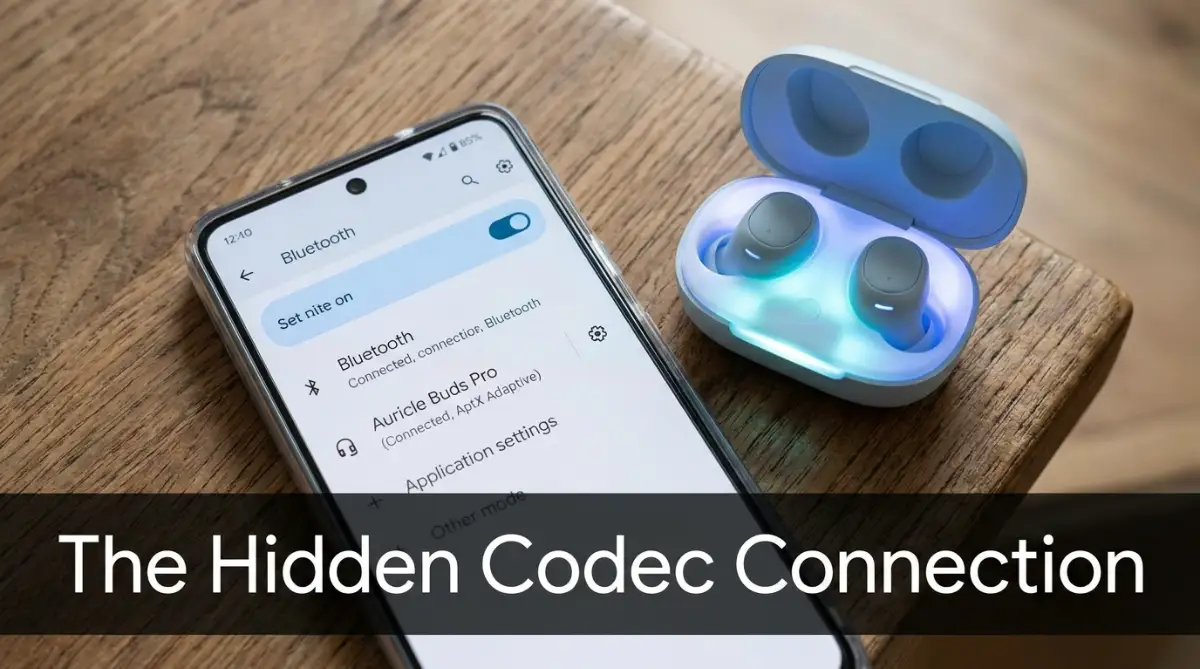
For Android users, the golden ticket is the aptX family of codecs, specifically "aptX Low Latency" or "aptX Adaptive." These were specifically engineered to compress audio at lightning speed, virtually eliminating any noticeable delay for mobile gamers and movie watchers.
I used to think my earbuds were completely broken until I realized my phone was forcing them to use the slow SBC language. Once I went into my developer settings and manually forced the phone to use aptX, the annoying lag vanished instantly. It honestly felt like putting on prescription glasses for the very first time.
If you want to see exactly how to unlock the hidden developer settings on your phone to change these audio languages, watch this quick tutorial.
Clearing the Invisible Traffic Jams
Sometimes your earbuds and your phone are speaking the exact same fast language, but the audio still stutters and lags behind. When this happens, the problem is usually not the software; it is the physical environment around you.
Bluetooth operates on the 2.4 GHz radio frequency band. This is the exact same invisible highway used by your home Wi-Fi router, your microwave oven, your wireless mouse, and even your neighbor's baby monitor.
If you live in a dense apartment building and try to watch a movie on your tablet, your tiny Bluetooth signal is trying to shout over a massive, deafening crowd of other radio waves.
This heavy interference forces your phone to constantly resend dropped data packets to your earbuds. Every time a packet has to be resent, the audio gets delayed by another fraction of a second.
If you only experience audio delay while sitting at your specific computer desk at home, take a quick look around. Are your earbuds sitting right next to a massive dual-band Wi-Fi router? Is your computer using a cheap, unshielded USB hub that is leaking radio noise?
Simply moving your body three feet away from a heavy interference source can instantly clear up a lagging audio connection.
The Master and Slave Connection Flaw
True wireless earbuds have a very unique technical challenge that big over-the-ear headphones do not have to deal with. Because there is no physical wire connecting your left ear to your right ear, the audio signal has to make an extra, difficult jump.
In older or cheaper models, the smartphone shoots the entire audio signal to the right earbud first. The right earbud acts as the "Master." It plays the right-channel sound, and then it frantically bounces the left-channel sound over your skull to the "Slave" earbud in your left ear.
This extra bounce requires additional processing time. The human head is mostly made of water, and water is incredibly dense. It acts like a massive concrete wall for weak radio frequencies.
If the connection between the two tiny earbuds gets slightly disrupted by your own body water, the master earbud has to delay the entire track so both ears stay in perfect sync with each other. This creates a massive delay between what you see on the screen and what you hear.
Modern, premium earbuds have largely solved this by using independent connections. The smartphone sends the left audio directly to the left ear, and the right audio directly to the right ear at the exact same time.
If your current earbuds use that old bouncing method, no amount of software tweaking will ever make them fast enough for serious mobile gaming. You are fighting a physical hardware limitation.
The Sneaky Video App Compensation Trick
Have you ever noticed that your audio lag is incredibly terrible when you are playing a video game, but it seems completely fine when you are watching Netflix or YouTube?
This is not a random coincidence. It is actually a brilliant software trick engineered by the big streaming companies.
When you open YouTube and hit play on a video, the app secretly asks your phone how much Bluetooth latency your specific earbuds currently have. If the phone reports a massive half-second delay, the YouTube app does something incredibly clever.
It intentionally delays the video playback on your screen by that exact same half-second.
The app artificially holds the video back so it perfectly matches the slow audio arriving at your ears. You never notice the lag because the app is hiding it from you by slowing down the picture.
However, video games absolutely cannot do this. A video game is happening live, in real-time, based on exactly where your fingers tap the screen. The game cannot delay the visual of you shooting a zombie, so you feel the full, painful reality of your slow Bluetooth connection.
If you are a heavy mobile gamer, you cannot rely on streaming app compensation. You must look for earbuds that feature a dedicated Game Mode.
Game Mode purposefully lowers the overall audio quality just a tiny bit to push the sound out faster. The explosions might sound slightly less crisp, but the latency drops from a noticeable two hundred milliseconds down to a blazing fast fifty milliseconds.
The Battery Starvation Effect
Here is a very sneaky issue that catches people entirely off guard. You might have a perfectly matched codec, zero interference, and an expensive pair of earbuds, but you still experience sudden, random audio stuttering.
Check the battery level on your earbuds, and then check the battery level on your smartphone.
When your devices drop below twenty percent battery, they often go into a hidden power-saving survival mode. To keep the device alive longer, the internal processor deliberately slows down its own performance.
When the processor slows down, the audio compression process takes significantly longer to complete. The Bluetooth transmission power gets heavily weakened to save juice.
The end result is a sudden spike in audio latency simply because your phone is too tired to process the data fast enough. You must keep your devices properly charged if you want peak audio performance.
If you are sitting down to watch a two-hour movie, make sure your phone and your case have plenty of power before you hit play. A hungry device is always a slow device.
The Distance and Body Blocking Factor
We often forget that Bluetooth is essentially a very weak, short-range radio signal. It is completely invisible, but it still has to obey the strict physical laws of nature.
The maximum effective range of a standard Bluetooth connection is usually around thirty feet in a completely empty room. But your living room or a crowded subway station is not an empty room.
As mentioned earlier, the absolute biggest blocker of radio waves in your daily environment is actually your own physical body. If you put your smartphone in your back left pocket, and the primary receiver for your earbuds is in your right ear, you have a problem.
That diagonal radio signal has to blast directly through your dense torso to reach its destination.
This heavy physical blocking severely weakens the connection strength. When the signal gets weak, data packets get lost in the air. The phone has to resend them, creating that terrible, annoying stutter and delay.
If you are experiencing random audio lag while walking down the street, try something incredibly simple. Just take your phone out of your back pocket and move it to your front jacket pocket, or hold it in your hand.
By removing your watery torso from the direct line of sight, the radio waves can travel freely, instantly fixing the connection and dropping the latency back to normal levels.
Why Restarting Actually Works
Whenever we have a tech problem, the very first piece of advice is always to turn it off and turn it back on again. It sounds like a lazy cliché, but it is actually deeply rooted in computer science.
Your smartphone is essentially a tiny computer that never sleeps. Over days and weeks of continuous use, the Bluetooth software cache gets filled up with temporary junk data.
Sometimes, an old connection profile from your car stereo gets tangled up with the active connection profile of your earbuds. This software confusion causes the Bluetooth radio to work twice as hard, leading directly to processing delays.
Simply turning Bluetooth off in your settings menu and turning it back on is often not enough to clear this deep software cache. You need to completely restart your smartphone.
Expert Pro-Tip: The Weekly Reboot
I make it a strict rule to restart my smartphone at least once every Sunday night. This simple habit clears out corrupted Bluetooth cache files and prevents random audio stuttering before the work week begins.
Rebooting the phone flushes out all the temporary memory, clears any stuck background processes, and gives the Bluetooth radio a completely fresh start. I make it a habit to restart my phone at least once a week, and it has drastically reduced the number of random audio hiccups I experience.
It is the easiest, fastest troubleshooting step you can possibly take, and it solves the problem more often than you might think.
Expert Hardware Hacks for Flawless Wireless Sound
Now that we have covered the deep software settings and invisible radio interference, it is time to look at the physical hardware itself. Fixing a laggy connection is not always about messing with hidden developer menus on your phone.
Sometimes, the smartest way to achieve perfectly synced audio requires a hands-on, practical approach to how you actually handle your gear. You do not need a degree in sound engineering to maintain a flawless Bluetooth connection.
Let us break down a few advanced hardware secrets that professional audio testers use every single day to keep their expensive earbuds running at absolute peak performance.
The Deep Cleaning Reset Method
We wear our true wireless earbuds inside our bodies, which means they constantly collect sweat, natural skin oils, and earwax. While this sounds a bit gross, it is a massive technical problem.
The tiny metal charging contacts on the bottom of the earbuds often get coated in an invisible layer of this biological grime. When you put them back in the case, that thin layer of oil prevents the earbud from drawing a clean, strong electrical charge.
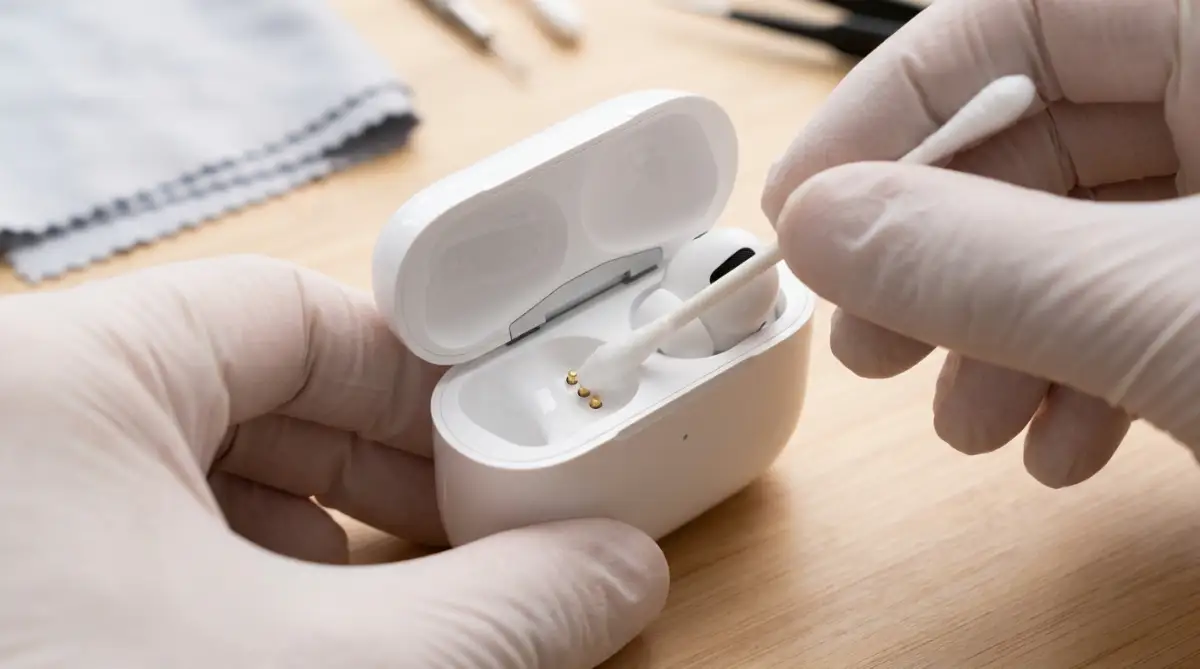
More importantly, it can actually scramble the brief data handshake that happens between the case and the earbuds when they sync up. This scrambled handshake leads directly to connection instability and noticeable audio delay later in the day.
Take a clean, dry cotton swab and gently wipe down the metal contacts on both the earbuds and the inside of the charging case at least once a week. This simple, two-minute physical cleaning routine prevents power delivery issues and keeps the internal Bluetooth processor running at maximum speed.
Keeping your tech physically clean is just as important as knowing how to speed up your phone by clearing app cache when the software gets bogged down.
Forcing a Factory Reset
If you have tried changing the codecs and moving away from your router, but the lag is still driving you crazy, your earbuds might be suffering from corrupted firmware. Over time, the tiny operating system inside the earbuds can develop small software bugs from constantly connecting and disconnecting to multiple different devices.
Do not just "forget" the device in your phone's Bluetooth menu. You need to perform a hard factory reset on the earbuds themselves.
Every brand has a slightly different method for this. Usually, you have to place both earbuds in the charging case, leave the lid open, and hold the physical button on the back of the case for about fifteen seconds until the LED light flashes red or white.
This action completely wipes the internal memory of the earbuds, erasing all the old, corrupted connection profiles. According to hardware experts at SoundGuys, a clean factory reset is the absolute most effective way to eliminate stubborn, unexplainable latency issues that software tweaks cannot fix.
Dedicated Bluetooth Transmitters
If you are trying to use your true wireless earbuds with an older television or a dedicated gaming console like a PlayStation or Nintendo Switch, you are going to hit a massive wall of latency.
These older devices have incredibly cheap, outdated Bluetooth chips built inside them. They literally do not possess the hardware power to process the fast aptX codecs we talked about earlier.
The expert workaround is completely bypassing the built-in Bluetooth entirely. You can buy a dedicated, high-speed Bluetooth transmitter that plugs directly into the USB or headphone port of your TV or console.
These tiny dongles are specifically engineered to speak the fastest, lowest-latency audio languages available. They grab the raw audio signal and shoot it to your earbuds with virtually zero delay, completely transforming an unplayable gaming experience into a flawless one.
This simple hardware upgrade is the perfect solution for gamers who want to play late at night without waking up the rest of the house. It is the audio equivalent of spotting and avoiding overheating issues to keep your expensive console running perfectly.

Careless Mistakes That Destroy Your Wireless Experience
Even when you know the exact technical tricks to fix the lag, it is incredibly easy to accidentally sabotage your own audio setup. Human beings love convenience, and we often sacrifice performance simply because we are moving too fast through our daily routines.
I have watched so many friends complain bitterly about their expensive earbuds, completely unaware that their own careless daily habits were actually causing the terrible connection issues. Let us walk through the most dangerous pitfalls you must absolutely avoid.
The Multi-Device Connection Trap
Modern true wireless earbuds often advertise a feature called "Multipoint Connection." This feature allows the earbuds to connect to your smartphone and your laptop at the exact same time. It sounds incredibly convenient on paper.
However, multipoint technology is a massive double-edged sword. When the tiny processor inside the earbud has to constantly maintain two separate active radio connections, it gets completely overwhelmed.
If you are watching a movie on your laptop, the earbud is still using a huge chunk of its processing power just listening for a random notification ping from your phone. This divided attention causes massive stuttering, randomly dropped audio, and severe latency spikes.
If you want absolutely perfect, fast audio sync while watching a movie or playing a game, you must manually disconnect the earbuds from every other device in the room. Force the earbuds to give one hundred percent of their processing power to a single device.
Leaving multiple connections open is just as careless as making dangerous password management mistakes that leave your digital life vulnerable to chaos. Keep it simple and focused.
Buying "Knock-Off" Budget Earbuds
We all love saving money, but the true wireless earbud market is flooded with incredibly cheap, terrible knock-offs. You see them advertised heavily on social media for twenty dollars, promising the exact same performance as premium brands.
This is a massive, frustrating lie. The only way a manufacturer can sell earbuds for twenty dollars is by using the absolute cheapest, oldest Bluetooth chips available in the factory.
These cheap chips physically cannot process modern, fast audio codecs. They are completely stuck in the slow lane. No amount of smartphone tweaking, resetting, or moving away from your router will ever fix the massive half-second delay built into that cheap silicon.
Ignoring Critical Firmware Updates
Many people do not realize that their tiny earbuds actually run a complex operating system, just like a smartphone or a laptop. And just like a smartphone, the manufacturer constantly discovers small bugs and software glitches after the product is released.
They fix these bugs by releasing firmware updates through their official companion app. But most users never bother to download the app, or they completely ignore the update notifications because it takes five minutes of their time.
Ignoring these updates is a terrible mistake. Manufacturers frequently release updates specifically designed to improve Bluetooth connection stability and drastically lower audio latency.
By refusing to update the firmware, you are actively choosing to live with the slow, broken software the earbuds shipped with on day one. It is a completely self-inflicted wound that ruins your daily tech experience.
Your Game Plan for Flawless Wireless Audio
Dealing with invisible audio lag can feel incredibly overwhelming, especially when you just want to sit back and relax with a good movie. But now that you understand the hidden mechanics of Bluetooth technology, you hold all the power to fix the problem permanently.
You no longer have to suffer through badly dubbed video games or frustratingly slow dialogue. By manually choosing the fastest audio codec, keeping your hardware clean, and eliminating physical radio interference, you are forcing your tech to perform at its absolute best.
Take a few minutes right now to dive into your smartphone settings and run a factory reset on your charging case. You will be absolutely amazed at how quickly you can transform a stuttering, laggy connection into a flawless, cinematic experience.
I used to get so angry at my expensive earbuds that I almost threw them against a wall in pure frustration. The day I finally learned how to control the audio codecs and clear out the radio interference, it literally saved my sanity. You have the exact same power to take control of your wireless experience starting today!
Common Questions About Wireless Earbud Lag
Will buying Bluetooth 5.3 earbuds completely eliminate audio delay?
While newer Bluetooth versions like 5.2 and 5.3 offer much better connection stability and energy efficiency, they do not magically eliminate audio delay on their own. The actual speed of the audio still heavily depends on the specific codec (like aptX or AAC) both your phone and earbuds are using.
Why does the audio lag only happen when I play mobile games?
Video apps like YouTube and Netflix use software tricks to secretly delay the video on your screen so it matches the slow audio arriving at your ears. Video games happen in real-time based on your finger taps, so the game physically cannot delay the video, exposing the true latency of your Bluetooth connection.
Does turning up the volume make the Bluetooth connection lag more?
No, the volume level has absolutely zero impact on the speed or latency of the audio signal. However, playing audio at maximum volume will drain the tiny battery much faster, which can eventually lead to stuttering when the earbud goes into low-power survival mode.
Can a thick phone case cause my earbuds to disconnect?
Yes, it actually can. If you use a massive, heavy-duty phone case made with metal components or thick, dense rubber, it can partially block the weak Bluetooth radio antenna inside your phone. This physical blocking leads to dropped data packets and severe audio stuttering.
Is it normal for the left earbud to lag behind the right one?
No, that is not normal for modern premium earbuds. If one earbud is noticeably lagging behind the other, the internal master/slave connection is failing to sync properly. You should immediately place both earbuds back into the case and perform a full factory hardware reset.
Disclaimer: The information provided in this article is for educational and troubleshooting purposes only. Smartphone operating systems, developer menus, and Bluetooth hardware configurations vary wildly between different brands and models. Altering advanced developer settings on your device can sometimes cause unexpected software behavior. Always refer to your specific manufacturer's official guidelines before performing hardware resets or changing system codecs. We are not responsible for any software glitches, voided warranties, or hardware damage resulting from the interpretation of this general guide.