
The Heavy Price of Following the Hype
Staring at a bright red graph while your hard-earned money vanishes overnight is an absolutely sickening feeling. When I first entered the crypto market, I bought into the hype, panicked during a massive price spike, and lost a chunk of my savings to a completely worthless coin. It took that painful, embarrassing crash for me to realize that digital markets are not a casino; they are a psychological battlefield. Let's look at exactly how human emotions destroy beginner portfolios and how to build a cold, calculated strategy to keep your money perfectly safe.

Your 4-Step Crypto Safety Plan:
- Never buy a digital asset during a massive, public price spike; buying out of FOMO means you are providing the exit liquidity for early investors.
- Centralized exchanges act like casinos holding your real money—if the platform goes bankrupt or gets hacked, your balance instantly drops to zero.
- Take physical custody of your wealth by setting up a private wallet, which gives you the exclusive master key (seed phrase) to your funds.
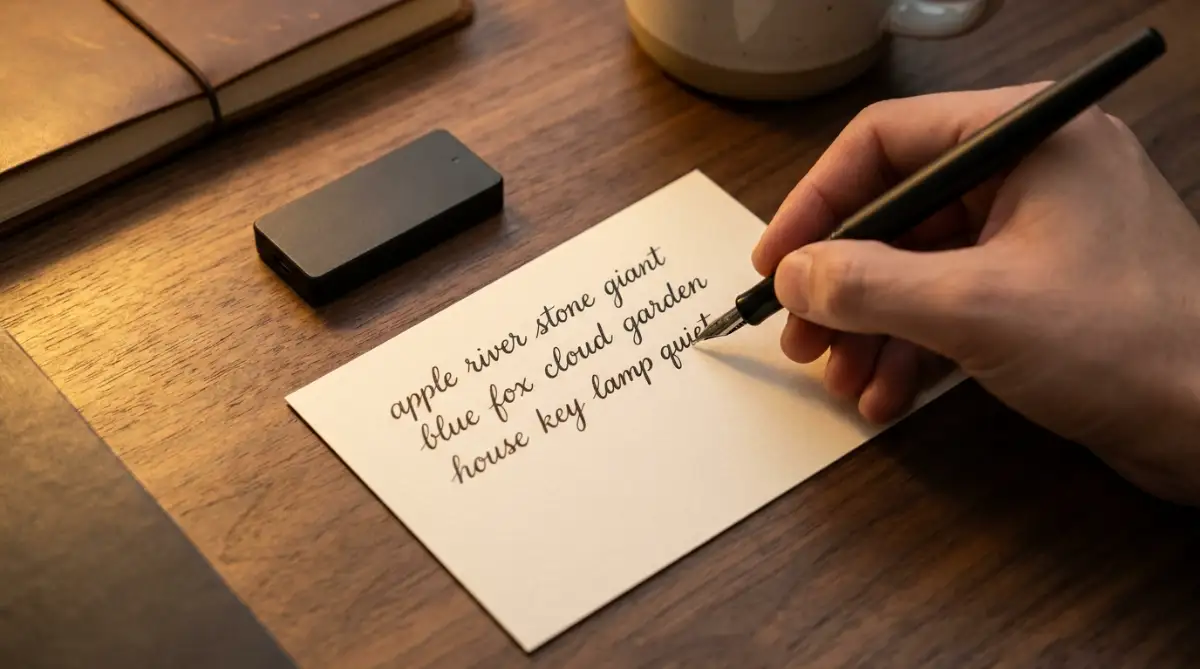
- Never take a digital photo or screenshot of your recovery seed phrase; physically write the words on paper to protect them from cloud storage hackers.
Decoding the Psychology of the "Fear of Missing Out" (FOMO)
Before we talk about wallets, seed phrases, or specific digital tokens, we have to talk about your brain. The absolute fastest way to go completely broke in this market has absolutely nothing to do with complex computer code.
It has everything to do with a heavy, primal emotion known as FOMO, or the Fear of Missing Out.
When you see a specific coin jump fifty percent in value on a bright green chart, your brain is instantly flooded with adrenaline. Your logical, rational thinking process completely shuts down, and your primal survival instincts take over the steering wheel.
You convince yourself that if you do not buy that exact coin right this very second, you will be poor forever while everyone else gets rich.
The Rocket Ship Analogy:
Think of a trending coin exactly like a massive rocket ship taking off from a launchpad. If you buy the coin after it has already launched high into the sky, you are not a passenger; you are the rocket fuel.
The people who bought the coin quietly when it was sitting safely on the ground are now selling their bags at the very top. They need someone to buy those highly inflated bags so they can cash out their massive profits.
When you buy a coin during a massive, public green spike, you are providing the exit money for the early investors. The exact moment you buy, the rocket runs out of fuel and crashes violently back to earth, leaving you holding a completely worthless digital bag.
My Personal "Anti-FOMO" 24-Hour Rule 🛑
Whenever my heart starts racing about a new coin, I force myself to answer three strict questions before buying:
- Did I hear about this from a noisy influencer or from reading the actual project whitepaper?
- Has the price already spiked more than 20% in the last 24 hours? (If yes, the rocket already left without me).
- Do I actually understand what problem this technology solves?
- If I fail any of these, I close my laptop and walk away for exactly 24 hours. The hype usually dies completely by the next morning.
Your Actionable Strategy Against FOMO:
You must create a strict, unbreakable personal rule starting today. If a digital project is currently trending heavily on Twitter, or if your favorite YouTube influencer is aggressively screaming that you must buy it right now, you must completely ignore it.
Close the application and walk entirely away from your computer for twenty-four hours. Never, under any circumstances, buy an asset while your heart rate is elevated.
Professional investors buy when the market is boring, quiet, and completely boring to read about. They sell when the market is loud, exciting, and filled with screaming retail buyers.

The Catastrophic "Not Your Keys, Not Your Coins" Error
If you manage to avoid the heavy emotional traps, you will quickly face your next massive hurdle. When beginners buy their first digital asset, they usually use a massive, public centralized exchange like Coinbase or Binance.
They buy their coins, look at the balance on the screen, and happily log off, assuming their money is sitting perfectly safe in a digital vault. This is the most widespread, dangerous technical misunderstanding in the entire industry.
When your money sits on a centralized exchange, you do not actually own the underlying asset.
The Casino Chip Scenario:
Imagine walking into a massive Las Vegas casino and trading one thousand real dollars for a stack of plastic casino chips. As long as you stay inside the building, those chips represent your real money.
But if the casino suddenly goes completely bankrupt, catches on fire, or gets raided by the police, you cannot take those plastic chips to a local grocery store to buy food. The casino holds the real cash in their back vault.
A centralized exchange operates exactly like that casino. They hold the real cryptographic master keys to the digital assets, and they simply show you a plastic chip on your screen.
If the exchange gets hacked by international thieves, or if the CEO decides to run away with the company funds, your account balance will instantly drop to zero. You will have absolutely no legal or mathematical way to recover a single penny.
I made this exact terrifying mistake during my first year of investing, leaving thousands of dollars sitting on a generic exchange because I was simply too lazy to learn how a private wallet worked. My biggest realization came when that specific exchange suddenly froze all customer withdrawals for a week due to "technical issues," and I had to spend seven days feeling violently sick, completely powerless to touch my own money.
Pro Tip: The "Transfer Ratio" Strategy 💼
You do not have to abandon exchanges completely—you just need to use them correctly. I use an 80/20 rule:
- 80% of my portfolio: Locked safely in a cold hardware wallet sitting in my desk drawer.
- 20% of my portfolio: Left on a centralized exchange strictly for quick, daily trading opportunities.
- Treat the exchange like a public wallet for daily spending, and your hardware wallet like an untouchable savings vault.
If you are terrified of losing your investments to a hacked platform, you absolutely must watch this clear, visual breakdown of how to move your money off an exchange safely.
Setting Up Your Unbreachable Personal Vault
To completely eliminate the risk of an exchange stealing your money, you must take physical custody of your own digital wealth. This requires setting up a private, non-custodial wallet.
When you create a private wallet, the software generates a highly complex, random string of twelve or twenty-four English words. This specific list of words is known as your Seed Phrase or Recovery Phrase.
This list of words is the absolute master key to your digital bank account on the blockchain.
The Digital Nightmare of Cloud Storage:
The second biggest mistake beginners make happens the exact moment they see these twenty-four words on their computer screen. Because writing takes physical effort, they naturally pull out their smartphone and take a quick, convenient photograph of the screen.
Or worse, they copy the words and paste them directly into an online note-taking app like Google Keep or Apple Notes.
This lazy habit is an absolute disaster waiting to happen. The moment you take a picture, your smartphone automatically uploads that image to your cloud storage servers.
Highly sophisticated hackers write automated software scripts that scan millions of cloud storage accounts every single day, specifically looking for pictures that contain twenty-four English words. If a hacker finds that picture in your cloud account, they can instantly recreate your wallet on their own laptop in Russia and drain every single dollar in five seconds.
Your Actionable Security Protocol:
You must treat your twenty-four-word seed phrase like a highly classified, top-secret government document. The exact moment the words appear on your screen, you must write them down on a physical piece of heavy paper using a dark, waterproof pen.
Check the spelling of every single word three times to ensure absolute perfection. Once you have the physical paper, you must immediately delete any digital traces of it from your computer.
Place that physical piece of paper inside a waterproof envelope or a fireproof lockbox. Hide the lockbox in a highly secure location inside your house where a casual burglar or a visiting house guest could never accidentally find it.
Advanced Strategies for Perfect Aim Calibration
Once you understand the basic physical differences between high and low sensitivity, we must look much deeper into the digital rules of your operating system. Your mouse software is not just a passive tool; it is a highly active engine that completely dictates your gaming survival.
According to competitive aiming guides published by Esports Healthcare, finding a mathematically balanced sensitivity is the absolute foundation of preventing severe wrist injuries [1]. You must learn to use these established ergonomic frameworks to protect your tendons from sudden friction damage.
Technical performance data shared by NVIDIA reveals that optimizing your USB polling rate can physically lower your input delay by up to fifty percent [2]. Knowing how to monitor your hardware's report rate is incredibly important before you jump into a competitive, high-stakes match.
If you try to bypass basic hardware rules by using a heavy wireless mouse on a tiny pad, you risk causing permanent hand fatigue. You must avoid these physical errors just as you would avoid the silent DIY solar mistakes that destroy your home insurance payout to protect your wealth and peace of mind.
Let us explore the advanced, pro-level secrets you can use to build an unbreakable wall of consistency around your gaming aim today.
The Secret of Understanding Polling Rate (Hertz)
While DPI controls how fast your cursor moves, another setting called Polling Rate controls how fast your mouse talks to your computer. Polling rate is measured in Hertz (Hz), and it tells the operating system exactly how many times per second your mouse reports its physical location.
If your polling rate is set to 125Hz, your mouse is telling the computer where it is 125 times every single second. This creates an eight-millisecond delay between your physical hand movement and the digital crosshair movement on your screen.
Eight milliseconds might sound incredibly fast to a normal person, but in a competitive video game, it is an absolute eternity.
The Strobe Light Analogy:
Imagine trying to catch a baseball in a dark room where a strobe light flashes only once every two seconds. You would never catch the ball because your brain is missing massive chunks of visual information.
A low polling rate acts exactly like that slow strobe light for your computer processor. When you increase the polling rate to 1000Hz, the strobe light flashes one thousand times a second, making the movement look perfectly smooth and completely uninterrupted.
Your Actionable Strategy:
You must open the official software program that came with your gaming mouse (like Razer Synapse or Logitech G Hub). Locate the performance tab and change your polling rate to exactly 1000Hz or 1ms.
Do not push the setting higher than 1000Hz (like 4000Hz or 8000Hz) unless you own a highly expensive, 240Hz gaming monitor and a top-tier computer processor. If you force an old computer to process 8000 signals a second, the CPU will overheat and cause your game to stutter violently.
Keeping your hardware running smoothly prevents sudden frame drops and heat damage, just like learning simple ways to spot and avoid overheating issues saves your gaming console from melting.
Finding the Perfect Baseline Using the "360 Test"
Now that your hardware is optimized, we have to find the exact mathematical eDPI number that fits your specific desk space. You cannot simply copy your favorite streamer's settings because their physical arms are a different length than yours.
To find your perfect baseline sensitivity, you must use a highly practical method called the 360-Degree Sweep Test.
Load into an empty, private practice server in your favorite game. Stand in the middle of the room and aim your crosshair directly at a specific bullet hole on the wall.
Place your physical mouse on the absolute far left edge of your mousepad. Now, slowly sweep your mouse across the pad until you hit the absolute far right edge of the mousepad.
How to Read the Results:
If your in-game character spun around five full times before you reached the edge of the pad, your sensitivity is dangerously high. You need to lower the in-game slider immediately.
If your character only spun halfway around (180 degrees), your sensitivity is far too low, and you will not be able to turn around if someone attacks you from behind.
Your ultimate goal is to adjust the in-game sensitivity slider until one full sweep across your entire mousepad equals exactly one 360-degree turn in the game. This mathematical balance guarantees that you will never run out of mousepad space during a panicked gunfight.

Silent Hardware Traps That Will Ruin Your Accuracy
Even highly intelligent gamers make terrible choices when they are trying to improve their setup quickly on a tight budget. The heavy stress of losing ranked matches often makes us buy cheap, useless accessories or ignore basic physical maintenance.
If you fall into these common traps, your hand-eye coordination will eventually experience a complete, permanent failure. This frustrating cycle can easily ruin your weekend, destroy your gaming confidence, and cause intense physical pain.
Here is exactly what you must avoid to keep your physical health safe and your crosshair completely stable.
The "Glass Mousepad" Disaster
One of the worst mistakes beginners make is buying highly expensive, hard glass or hard plastic mousepads. They see marketing ads claiming that a hard surface provides "ultimate speed and zero friction."
While a glass pad definitely makes your mouse glide faster, it completely removes your ability to stop the mouse physically. Friction is not your enemy; friction is the physical brake pedal that stops your crosshair exactly on the enemy's head.
The Ice Skating Analogy:
Think of a glass mousepad exactly like trying to run a sprint on a frozen ice-skating rink while wearing smooth, flat shoes. You can definitely run fast, but the exact second you try to stop, you will slip, fall, and slide twenty feet past the finish line.
A high-quality cloth mousepad acts like a rubber running track. It provides just enough physical friction to let your hand stop instantly and predictably.
If your gaming setup fails because you neglected to check your physical accessories, the frustration can build up fast. You do not want to be forced into researching how to get unsecured loans with bad credit and actually get approved just to replace a completely shattered glass desk pad.
Always stick to thick, premium cloth mousepads and wash them gently with warm water every three months to keep the surface perfectly consistent.
Using a Mouse With a Bad "Lift-Off Distance"
If you play on a low sensitivity, you have to constantly pick your mouse up off the desk to reposition it. This physical action exposes a massive hidden flaw in cheap gaming mice called Lift-Off Distance (LOD).
LOD is the exact height your mouse has to reach before the camera sensor stops tracking the desk surface. If your mouse has a high LOD, the sensor will keep reading the desk even when the mouse is hovering half an inch in the air.
The Consequence of High LOD:
Every time you pick the mouse up to reset your hand, your in-game camera will violently jerk downward toward the floor. When you place the mouse back down, your crosshair will be pointing at your character's feet instead of the enemy.
Maintaining your hardware precision requires a strong, active awareness of your settings. Just like using natural home remedies to fix extremely dry and flaky skin heals your face gently without harsh chemicals, keeping a low lift-off distance protects your aim from jagged movements.
Always open your mouse software and manually set your Lift-Off Distance to the absolute lowest possible setting (usually 1mm).
DO's and DON'Ts For Perfect Aim:
- DO use a mouse bungee or tape your cable to the monitor to prevent cable drag from ruining your aim.
- DO NOT constantly change your crosshair color or shape after every single bad game.
- DO practice aiming in aim-trainer software for exactly ten minutes before joining a real match.
- DO NOT grip your mouse so tightly that your knuckles turn white, as this causes instant hand tremors.
Common Questions About Mouse Sensitivity Settings
Is 1600 DPI better than 800 DPI for competitive gaming?
No, higher is not always better. While 1600 DPI reduces input lag slightly compared to 400 DPI, it also makes the sensor highly sensitive to tiny dust particles and microscopic hand tremors. The vast majority of professional players prefer the stable consistency of 800 DPI.
Why does my mouse feel completely different in different games?
Every single video game developer codes their camera movement engine differently. A sensitivity of 1.5 in Valorant feels completely different from a 1.5 in Call of Duty, which is why you must calculate your universal eDPI to match them up mathematically.
Does a heavier mouse make aiming more stable?
A heavy mouse might feel stable for tiny wrist movements, but it creates massive momentum problems. When you try to stop a heavy mouse quickly, the sheer physical weight forces your hand to overshoot the target, which is why ultra-lightweight mice (under 70 grams) are the modern standard.
How long does it take to learn a brand new low sensitivity?
If you drastically lower your sensitivity to start arm aiming, it will feel incredibly heavy, slow, and clumsy for the first few days. It typically takes about two weeks of consistent, daily practice for your brain to completely rewrite its old muscle memory and feel totally comfortable.
Your Master Plan for Flawless Gaming Accuracy
Navigating the complicated math of gaming hardware does not have to be a scary, mysterious, or overwhelming experience. You now hold the exact same strategic knowledge that professional e-sports coaches use to train world champions.
By taking a few short minutes to turn off mouse acceleration, calculate your eDPI, and secure a large cloth mousepad, you completely remove the fear of inconsistent aiming. You are no longer crossing your fingers and hoping your hand decides to work today.
Instead, you are confidently commanding your own physical hardware like a seasoned digital athlete. This simple shift in your daily routine gives you incredible power over your entire competitive gaming future.
My personal accuracy skyrocketed the exact day I finally turned off Windows mouse acceleration and committed to using my entire arm to aim. Stop blaming your own reflexes, take five minutes right now to calculate your true eDPI, and instantly feel the massive relief of having your cursor land exactly where you want it.
Disclaimer: The information provided in this article is for educational and general informational purposes only and does not constitute professional technical support, medical advice for wrist pain, or competitive coaching. Gaming hardware sensors, operating system settings, and in-game multipliers vary heavily by brand, manufacturer, and specific game engine. Always consult with your device's official software manual or a certified hardware technician regarding the exact specifications, polling limits, and configuration requirements of your personal gaming equipment.