
The Silent Agony of the Buffering Wheel
Have you ever sat down to watch your favorite show after a long, exhausting day, only to be greeted by the spinning loading wheel of death? It is incredibly frustrating to pay hundreds of dollars for high-speed internet, only to have the connection drop to zero when you move just one room away. I know that silent anger all too well. Let me show you how your home is physically blocking those invisible radio waves—and how you can easily fix your dead zones without spending a dime on expensive gear.

📌 Quick Summary: How to Fix Your Wi-Fi Dead Zones
- Get it in the Open: Never hide your router behind a TV or inside a closed cabinet; let the radio waves breathe freely.
- Avoid Water: Keep your router far away from aquariums, radiators, and concrete walls that trap moisture and absorb your signal.
- Elevate the Router: Place your router high up on a wooden shelf so the signal can travel downward and outward over furniture.
- Split Your Bands: Connect fast devices to the 5 GHz band, and distant smart-home gadgets to the stronger 2.4 GHz band.
Decoding the Invisible Paths: How Wireless Signals Travel
Before you touch a single wire or log into your settings menu, you have to understand exactly what a Wi-Fi signal actually is. Your internet router does not magically beam the internet directly into your phone through a straight, invisible laser.
Your router is basically a tiny, highly energetic radio station. It broadcasts invisible radio waves outward in a giant, 360-degree sphere, exactly like dropping a heavy rock into the center of a quiet pond.
As those ripples travel outward across the water, they naturally lose their energy. When the ripples hit a large rock or a patch of thick weeds, they crash, break apart, and stop moving forward entirely.
Your home internet works on this exact same physical principle. If you place your router in the far, dusty corner of your basement, you are essentially throwing half of your expensive internet signal straight into the dirt outside.
To fix your dead zones, we have to become digital detectives and find the physical objects that are actively murdering your radio waves.
The Physical Blockade: Finding the Signal Killers
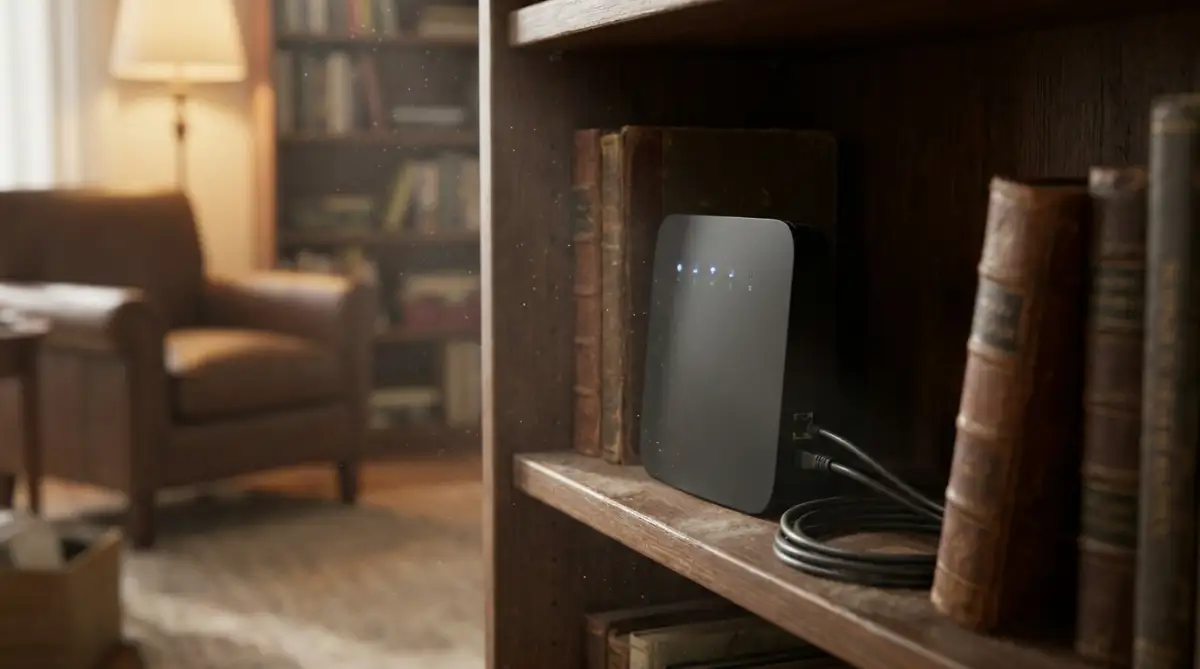
The absolute biggest mistake people make is treating their internet router like an ugly piece of garbage that needs to be hidden away. You probably unboxed your black plastic router and immediately shoved it behind your massive flat-screen television, or buried it deep inside a thick wooden bookshelf so your guests would not see the messy wires.
This purely aesthetic decision is the number one cause of home dead zones globally.
The Wall of Water Analogy:
Think of your wireless signal exactly like a beam of light from a strong flashlight. If you shine a flashlight through a clear glass window, the light passes through perfectly.
But if you shine that flashlight through a massive fish tank full of water, the light scatters, bends, and completely fails to reach the other side.
In the digital world, water is the absolute ultimate enemy of wireless radio frequencies. If you place your router directly next to a giant aquarium, a massive hot water heater, or even a thick concrete wall that holds moisture, the signal gets completely absorbed and destroyed on contact.
Did You Know? The Water-Wall Concept
Because Wi-Fi signals operate on radio frequencies that are highly sensitive to water, any dense liquid acts like a brick wall. This is exactly why placing your router directly next to a fish tank or a heavy radiator can instantly cut your home internet speed by more than half—the water literally swallows the invisible waves!
Your Actionable Strategy:
You must physically move your router today. You need to pull it out of the dark cabinet and place it directly out in the open.
The absolute best position for any router is high up on a wooden shelf, located in the central hallway or the exact middle room of your house. Getting the router up off the floor allows the radio waves to travel downward and outward, completely bypassing the heavy, dense furniture sitting on your carpets.
By simply placing the router in the open air, you instantly double the physical reach of your connection without touching a single software setting.
The Frequency Battle: 2.4 GHz vs. 5 GHz
If your router is sitting out in the open but your bedroom is still a dead zone, you are likely fighting a severe software battle.
Almost all modern routers are "Dual-Band," which means they operate under official industry standards set by the Wi-Fi Alliance to broadcast two completely separate radio stations at the exact same time.
These two invisible stations are called the 2.4 GHz band and the 5 GHz band.
Most people just connect all their household devices to whatever network name pops up first on their screen, completely ignoring the massive physical differences between the two.
The Sports Car vs. The Tractor Analogy:
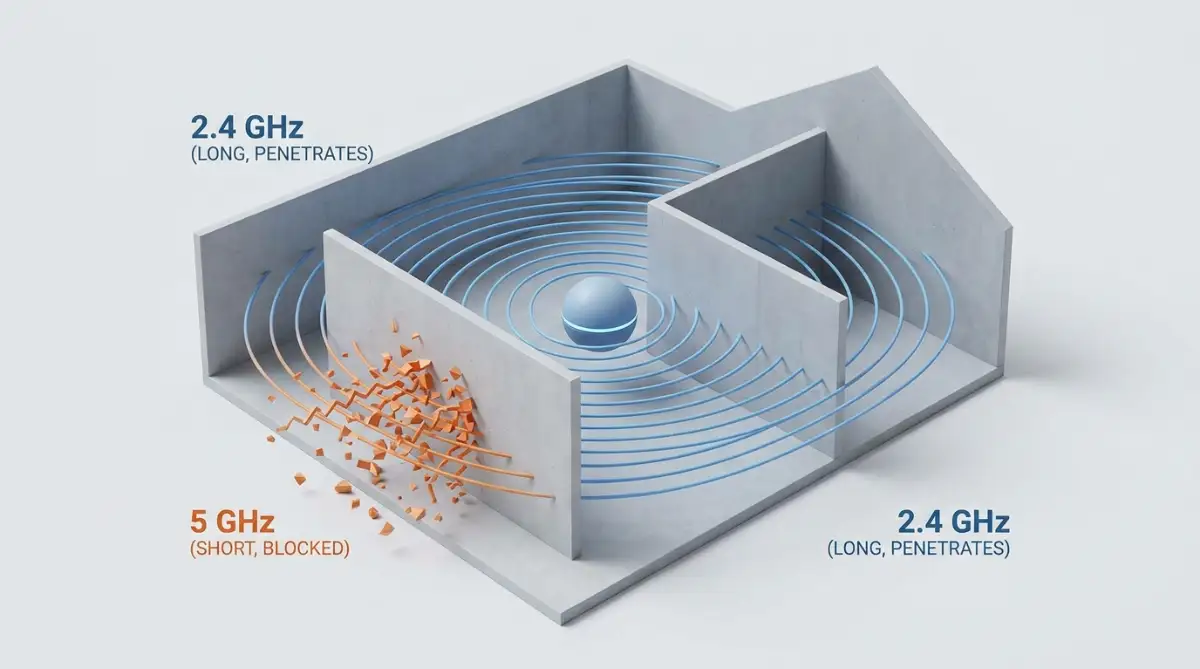
Think of the 5 GHz band exactly like a highly tuned, incredibly fast sports car. It can carry a massive amount of heavy data and stream high-definition movies beautifully.
But the exact second that sports car hits a thick brick wall, it violently crashes and stops moving. The 5 GHz signal is extremely fast, but it is physically too weak to pass through thick walls or travel long distances.
The 2.4 GHz band, however, acts exactly like a heavy, slow-moving farm tractor. It cannot carry as much high-speed data, but it is incredibly strong and can easily smash right through three thick bedroom walls and still reach your phone in the backyard.
I made the terrible mistake of connecting my smart television in the basement to my fast 5 GHz network, thinking it would make my movies load faster. My biggest realization was that the fast signal could not punch through my heavy kitchen floor, and switching the TV over to the slower, stronger 2.4 GHz band instantly fixed all my buffering problems forever.
If you are constantly dealing with buffering videos because you are connected to the wrong network band, you absolutely must watch this expert breakdown of how to choose the right frequency for your specific room. You can also read my complete guide on troubleshooting home wi-fi dead zones without buying an expensive router to fix your signal right now.
Organizing Your Digital Traffic Jam
Now that you know the difference between the fast car and the heavy tractor, you have to organize your household devices intelligently. If you put fifty heavy tractors onto a tiny dirt road, nobody is going to move anywhere.
This is called network congestion. When you have three smart speakers, a robotic vacuum, two smart thermostats, and four smartphones all trying to talk to the router on the exact same 2.4 GHz frequency, the router's brain gets completely overwhelmed.
The router is forced to put your important business video call on hold while it answers a tiny, useless data request from your smart lightbulb.
Your Actionable Network Strategy:
You must log into your router's settings and physically separate your devices based on their actual location and speed needs. Keeping your router dashboard secure is just as important as avoiding dangerous password management mistakes that leave your digital identity exposed to protect your home network from outside hackers.
Connect all your fast, heavy devices that are physically close to the router (like your main computer and living room television) directly to the 5 GHz network. This keeps the fast lane clear for heavy lifting.
Then, connect all your distant devices and tiny smart home gadgets (like your garage door opener or outdoor security cameras) to the slower, stronger 2.4 GHz network. This logical separation instantly stops the digital traffic jam, ensuring every single device gets exactly the right type of signal it actually needs.
Quick Look: The Frequency Compatibility Matrix
DO's and DON'Ts For a Strong Wi-Fi Connection:
- DO place your router high up on an open wooden shelf in a central hallway to let the signals broadcast downward freely.
- DO NOT hide your router inside a closed wooden TV cabinet or bury it behind a massive flat-screen television.
- DO connect your fast, heavy devices (like your PC or streaming TV) directly to the high-speed 5 GHz band.
- DO NOT overload the fast 5 GHz lane with slow smart-home gadgets like lightbulbs or thermostats (use the 2.4 GHz band for those instead).
Common Questions About Home Wi-Fi Dead Zones
Why does my Wi-Fi signal drop when I go behind a concrete wall?
Concrete, brick, and stone are incredibly dense materials that act like giant sponges to wireless signals. When the high-frequency radio waves from your router try to pass through a concrete wall, they get completely absorbed, causing your signal to drop to zero.
What is the actual difference between 2.4 GHz and 5 GHz networks?
The 5 GHz band is incredibly fast and perfect for streaming movies, but it is physically too weak to pass through walls. The 2.4 GHz band is much slower, but it is highly strong and can easily punch through multiple walls to reach your devices far away.
Where is the absolute best place to put my internet router?
You should always place your router high up on an open shelf, located in the central hallway or the exact middle room of your house. Keeping it off the floor and out of closed cabinets allows the invisible waves to travel downward and outward freely.
Can household appliances cause my internet connection to lag?
Yes, absolutely. Common household appliances like microwave ovens, baby monitors, and cordless phones operate on the exact same 2.4 GHz frequency as your router. When these appliances are running, they create massive wireless noise that can instantly slow down your internet.
Reclaiming Your Smooth Online Experience
Fixing your slow home internet does not have to be a scary, mysterious, or expensive experience. You now hold the exact same basic knowledge of wireless physics that professional network technicians use to set up enterprise offices. By taking a few short minutes to pull your router out of the dark cabinet, elevate it on a shelf, and split your network bands, you completely remove the frustration of dead zones. You are no longer crossing your fingers and hoping the loading wheel goes away.
Instead, you are confidently directing your own home network and protecting your digital speed. This simple change in your daily routine gives you incredible power over your entire online future. Take a look at your router right now, move it to an open space, and instantly enjoy the whisper-quiet, lightning-fast connection you actually deserve!
Disclaimer: The information provided in this article is strictly for educational and general informational purposes only and does not constitute professional network engineering, information technology, or cybersecurity advice. Individual home layouts, wall materials, ISP equipment, and local signal interference vary significantly from house to house. Always refer directly to your router manufacturer's official safety guidelines and user manual before changing any internal network settings or modifying your hardware placement.